LinkedIn sizes
LinkedIn Video Size and Specs (2026)

Aitijya Sarkar · Updated
Founder - Oiti | LinkedIn ghostwriting | 100M+ views
Quick answer: Export LinkedIn video as an MP4 at 1080 x 1350 (4:5) for a phone-first post, or 1920 x 1080 (16:9) for landscape footage. A video post can be up to 5 GB and 15 minutes long, at any shape from 1:2.4 (tall) to 2.4:1 (wide).
I ghostwrote LinkedIn posts for founders and coaches for six years, and when a client's video flopped, the script was rarely why. Usually it was the export. Most guides say 10 minutes. That number is real, but it's for Company Page tab videos, from a LinkedIn Help article last updated four years ago. A video you post from your profile gets 15 minutes. Ads have their own rules again. The table below keeps the three apart, and every number links to the LinkedIn page it came from.
LinkedIn video specs: posts, Pages and ads
A video post from your profile can run 15 minutes and 5 GB. A Company Page tab video stops at 10 minutes, and a video ad at 500 MB and 30 minutes.
| Spec | Video post (your profile) | Page tab video (Life / Career Pages) | Video ad |
|---|---|---|---|
| Max file size | 5 GB | 5 GB | 500 MB |
| Min file size | 75 KB | 75 KB | 75 KB |
| Max length | 15 minutes | 10 minutes | 30 minutes |
| Min length | 3 seconds (desktop), 2 seconds (mobile app) | 3 seconds | 3 seconds |
| Resolution | 256 x 144 to 4096 x 2304 | 256 x 144 to 4096 x 2304 | 360 to 1920 px per side, by ratio |
| Shape (aspect ratio) | 1:2.4 to 2.4:1 | 1:2.4 to 2.4:1 | 16:9, 1:1, 4:5 or 9:16 |
| Frame rate | 10 to 60 fps | 10 to 60 fps | Under 30 fps |
| Bit rate | 192 Kbps to 30 Mbps | 192 Kbps to 30 Mbps | Not listed |
| File type | MP4, MOV, WEBM, MKV and more | MP4 and others; not MOV, AVI or QuickTime | MP4 (H.264 or VP8) |
| Captions | Auto-captions in 10 languages, or upload a file | Not listed | SRT file |
| Thumbnail | Upload your own | Not listed | JPG or PNG, 2 MB max, same shape as the video |
Other sources: LinkedIn Help: video sharing troubleshooting, file types (a548372), LinkedIn Help: supported file types (a564109), LinkedIn Help: video specs for Pages and Career Pages (a1311816), LinkedIn Help: video ad specs (a424737).
Page one of Google gets three of these wrong:
- "10 minutes max." That's the Page tab video. A normal video post gets 15 (a7174587, and again in a548372).
- "LinkedIn doesn't take MOV." Also the Page tab article. For posts, LinkedIn lists MOV as supported, so an iPhone file uploads as it is. MP4 is still the safest choice everywhere.
- "Ads cap at 200 MB." LinkedIn's ad spec says 500 MB.
I believed the 10-minute number myself. A podcast host I wrote for in 2022 had a 12-minute clip from one of his episodes, and I told him to cut it into two posts. He uploaded the whole thing from his profile anyway, mostly to prove me wrong, and it went straight through.
LinkedIn contradicts itself on the ad frame rate. The Help article says ads should run under 30 fps, while the ad spec page on business.linkedin.com recommends 30 fps. Export ads at 25 or 29.97 fps and you meet both.
The best video size for a LinkedIn post
For a post, export 1080 x 1350 (4:5) if your viewers are on phones and 1920 x 1080 (16:9) if the footage is landscape, like a screen recording or a talk. LinkedIn doesn't publish a recommended ratio for posts, only the 1:2.4 to 2.4:1 range, so the export sizes below come from its video ad spec, which lists a size range for each ratio and marks 4:5 as its recommended one.
| Shape | Export at | Use it for |
|---|---|---|
| 4:5 portrait | 1080 x 1350 | Talking-head clips and anything made for phones |
| 1:1 square | 1080 x 1080 | Clips that need to work on desktop and phone equally |
| 16:9 landscape | 1920 x 1080 | Screen recordings, webinars, filmed talks |
| 9:16 vertical | 1080 x 1920 | Footage shot vertically on a phone, with faces and text inside the safe zone below |
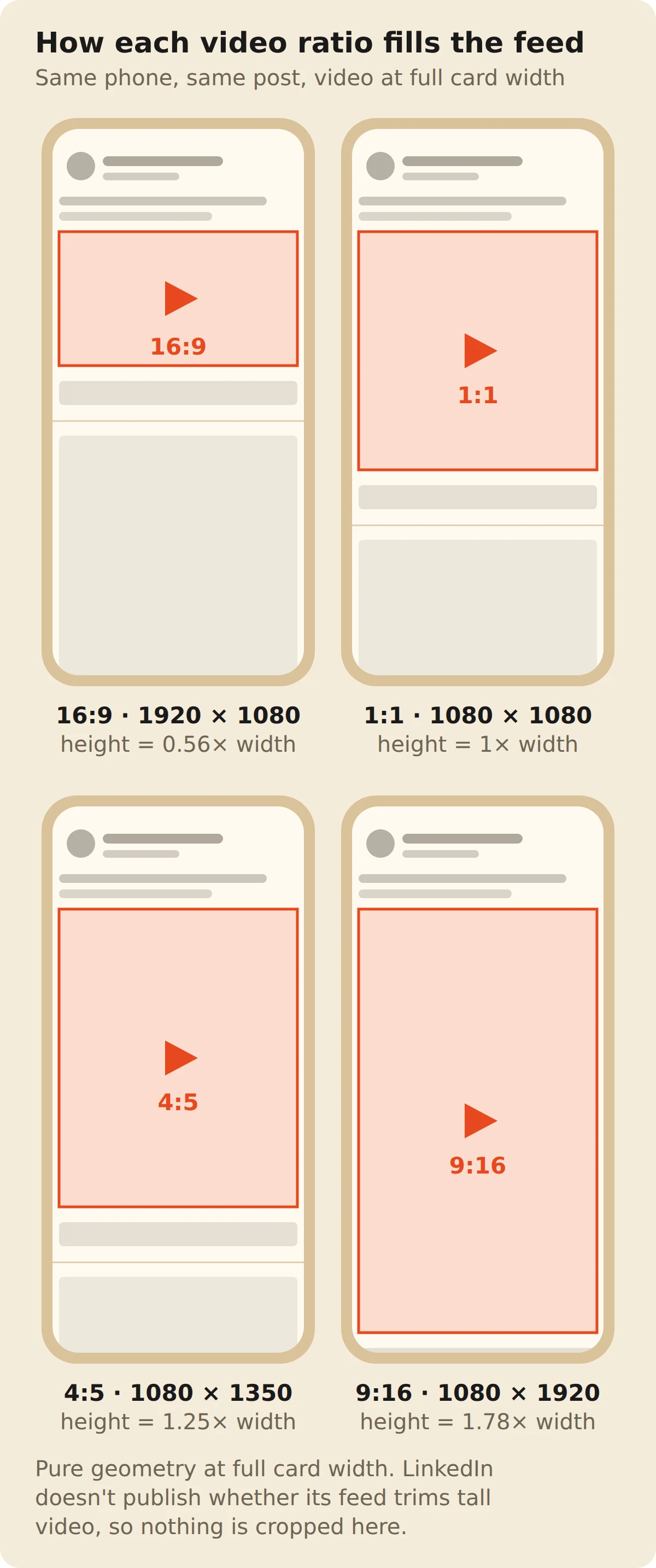
The shape decides how much of the screen the video gets before anyone taps it. At the width of a phone feed, a 4:5 video is more than twice as tall as a 16:9 one. That's why I shoot talking-head clips in portrait. If the footage is landscape to begin with, don't crop a screen recording into 4:5 to chase height. Tiny unreadable text costs you more than the extra height gets you.
A SaaS product marketer I wrote for found this out with a webinar clip. She posted it in 16:9, and on a phone she was a small face in the corner of a slide, with the next post already creeping up underneath. We recut the same answer at 4:5, framed on her, and it pulled more comments than anything else she posted that month.
LinkedIn won't take anything wider than 2.4:1 or taller than 1:2.4, so re-frame an ultra-wide 3:1 clip before you upload it.
The safe zone for vertical video
In LinkedIn's full-screen vertical player, a 1080 x 1920 frame has 260 pixels covered at the top, 560 at the bottom, 112 on the left and 210 on the right, which leaves a clear area of 758 x 1100. The numbers come from LinkedIn's own diagram in its Help article on full-screen vertical video. The 758 x 1100 is my arithmetic on those four margins.
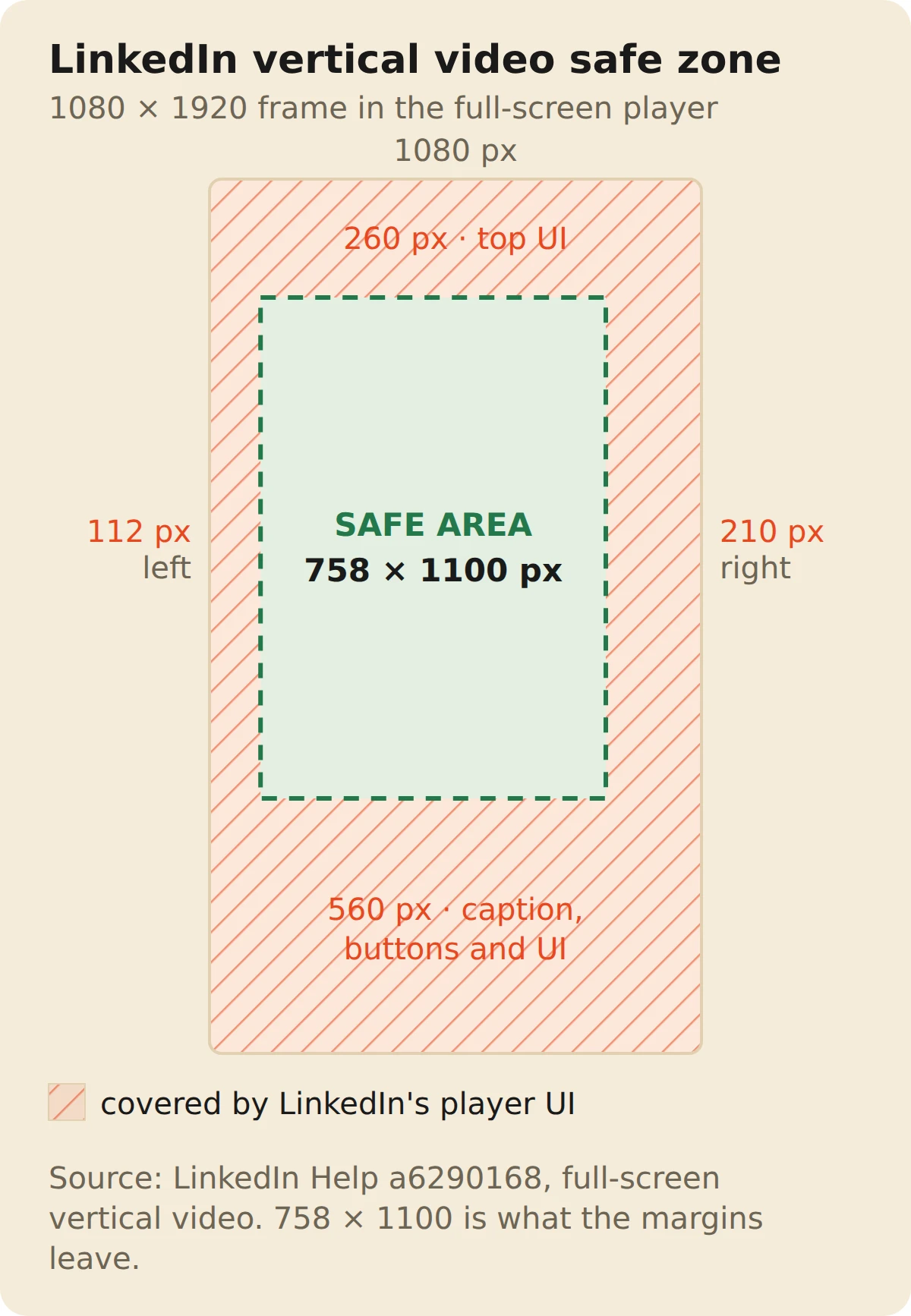
Source: LinkedIn Help: full-screen vertical video (a6290168).
The bottom band is the big one. Your name and the caption sit there, so burned-in subtitles placed low in the frame end up under the caption text. Raise them to the lower third of the clear area instead. The right band holds the reaction and comment buttons, which is why it's almost twice the width of the left one.
A fitness-business founder I wrote for had his editor burn subtitles in right at the bottom of every vertical clip, which looks fine in a phone's camera roll. In LinkedIn's full-screen player, his name and the post text landed right on top of them. We moved the subtitles up into the clear area and changed nothing else.
LinkedIn also says the ideal size depends on the viewer's device, and that videos with a larger aspect ratio "may be cropped on the sides as well as at the top and bottom," while wider ones "may be fitted to the screen." So treat the 758 x 1100 box as the part you control, and let the edges be background.
Export settings that stay inside LinkedIn's limits
Export an MP4 with H.264 video and AAC audio, at 30 fps for posts (25 or 29.97 for ads), and let the bit rate land anywhere between 192 Kbps and 30 Mbps. A standard 1080p H.264 export preset fits.
- Container. MP4. It's the one format posts, Page videos and ads all accept.
- Codec. H.264. LinkedIn's ad spec names H.264 or VP8, and H.264 is what every editor offers by default.
- Frame rate. Keep the source rate if it's between 10 and 60 fps. For ads, stay under 30.
- Audio. AAC. The ad spec caps the sample rate below 64 kHz, and the common 48 kHz is fine.
- Captions. Burn them in, or upload an SRT file. Plenty of people scroll the feed with the sound off.
How to upload a video to LinkedIn
- 01
Start the post.
On the home feed, click Video under "Start a post".
- 02
Pick the file.
Choose an MP4 or MOV under 5 GB and 15 minutes.
- 03
Set the thumbnail and captions.
Upload your own thumbnail if the first frame is dull. Turn on auto-captions or upload a caption file.
- 04
Write the caption.
Up to 3,000 characters, and only the opening lines show before "see more". You can tag people in the text.
- 05
Post.
Then check it on your phone, the smallest screen it will play on.
The caption does half the work. See every limit in LinkedIn character limits and how mentions work in how to tag someone on LinkedIn.
The cheat sheet
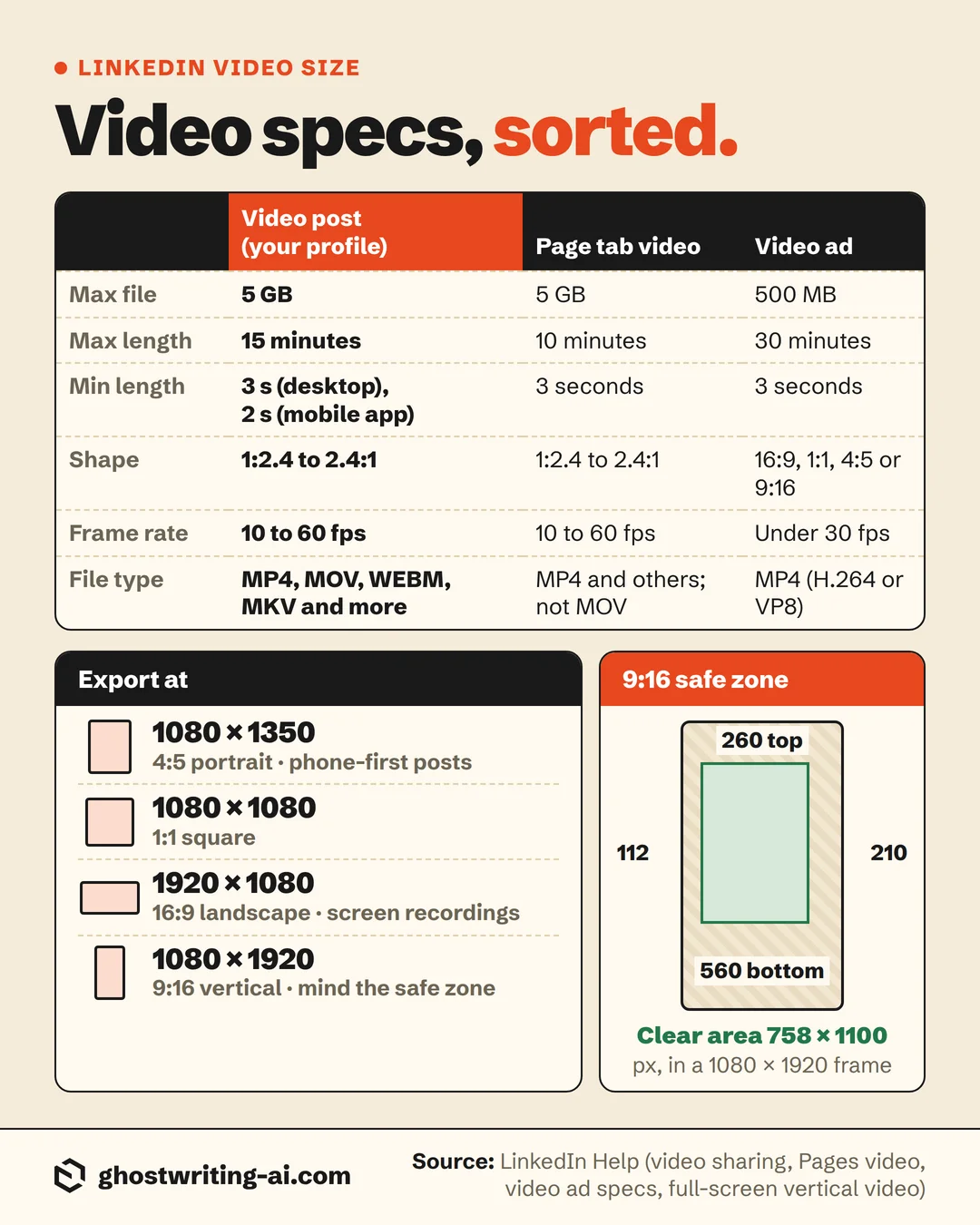
The bottom line on LinkedIn video size
Export an MP4 at 1080 x 1350 for anything people will watch on a phone, or 1920 x 1080 if the footage is landscape to begin with, and you're well inside the 15 minutes and 5 GB a profile post allows. The mistake that costs people is posting a landscape clip to a phone audience, where it gets less than half the height a 4:5 video does and the next post starts creeping up underneath it.
The other thing nobody checks is the frame people see before they press play. A dentist I wrote for, who owned a few practices, filmed a good clip about why he stopped selling whitening, and LinkedIn picked a first frame of him mid-blink with his mouth half open. That was the thumbnail all week. Every video I touch now gets its own thumbnail, checked on a phone first.
Free post preview
See where your caption gets cut before you post
The video gets the first look. The two lines above it decide whether anyone watches. Paste your caption into the free LinkedIn post preview and see exactly where "see more" cuts it on desktop and on mobile.
Open the post previewFrequently asked questions
- What is the best video size for LinkedIn in 2026?
- 1080 x 1350 (4:5) for posts meant for phones, or 1920 x 1080 (16:9) for landscape footage like screen recordings. Both are MP4, and both sit well inside LinkedIn's 1:2.4 to 2.4:1 range.
- How long can a LinkedIn video be?
- 15 minutes for a video post from your profile. The 10-minute limit you see quoted is for Company Page tab videos, and video ads can run up to 30 minutes.
- How big a video file can you upload to LinkedIn?
- 5 GB for a post or a Page video, and at least 75 KB. Video ads are capped at 500 MB.
- Can you post a 16:9 video on LinkedIn?
- Yes. 16:9 falls inside the range LinkedIn accepts, and 1920 x 1080 is the size to export. On a phone it takes up less than half the height a 4:5 video gets, so use it when the footage is landscape to begin with.
- Can you post a vertical 9:16 video on LinkedIn?
- Yes, at 1080 x 1920. In the full-screen player, keep faces and text inside the 758 x 1100 clear area, since LinkedIn's buttons and caption cover 260 px at the top, 560 at the bottom, 112 on the left and 210 on the right.
- Is a 3 minute video too long for LinkedIn?
- Not by LinkedIn's rules, which allow 15 minutes. Whether people watch to the end is up to the first few seconds and the caption above the video. I'd rather post a tight 90 seconds than a loose three minutes.
- Does LinkedIn support MOV files?
- For posts, yes. LinkedIn lists MOV among the supported types for video sharing. The "no MOV" line comes from the older Pages video article. If an upload fails anyway, re-export as MP4 with H.264.
- What are the LinkedIn video ad specs?
- MP4 with H.264 or VP8, 75 KB to 500 MB, 3 seconds to 30 minutes, under 30 fps, AAC audio. Sizes run up to 1920 x 1080 (16:9), 1920 x 1920 (1:1), 1080 x 1350 (4:5) and 1080 x 1920 (9:16).
The video's ready. Is the post around it?
Oiti is the AI clone for LinkedIn content. It learns how you actually write, from your past posts and what you believe, and drafts the caption and the posts in between, so they read like you typed them. Try it on your next video.
Start free7 days free.