LinkedIn limits
LinkedIn Character Limits for Every Field (2026)

Aitijya Sarkar · Updated
Founder - Oiti | LinkedIn ghostwriting | 100M+ views
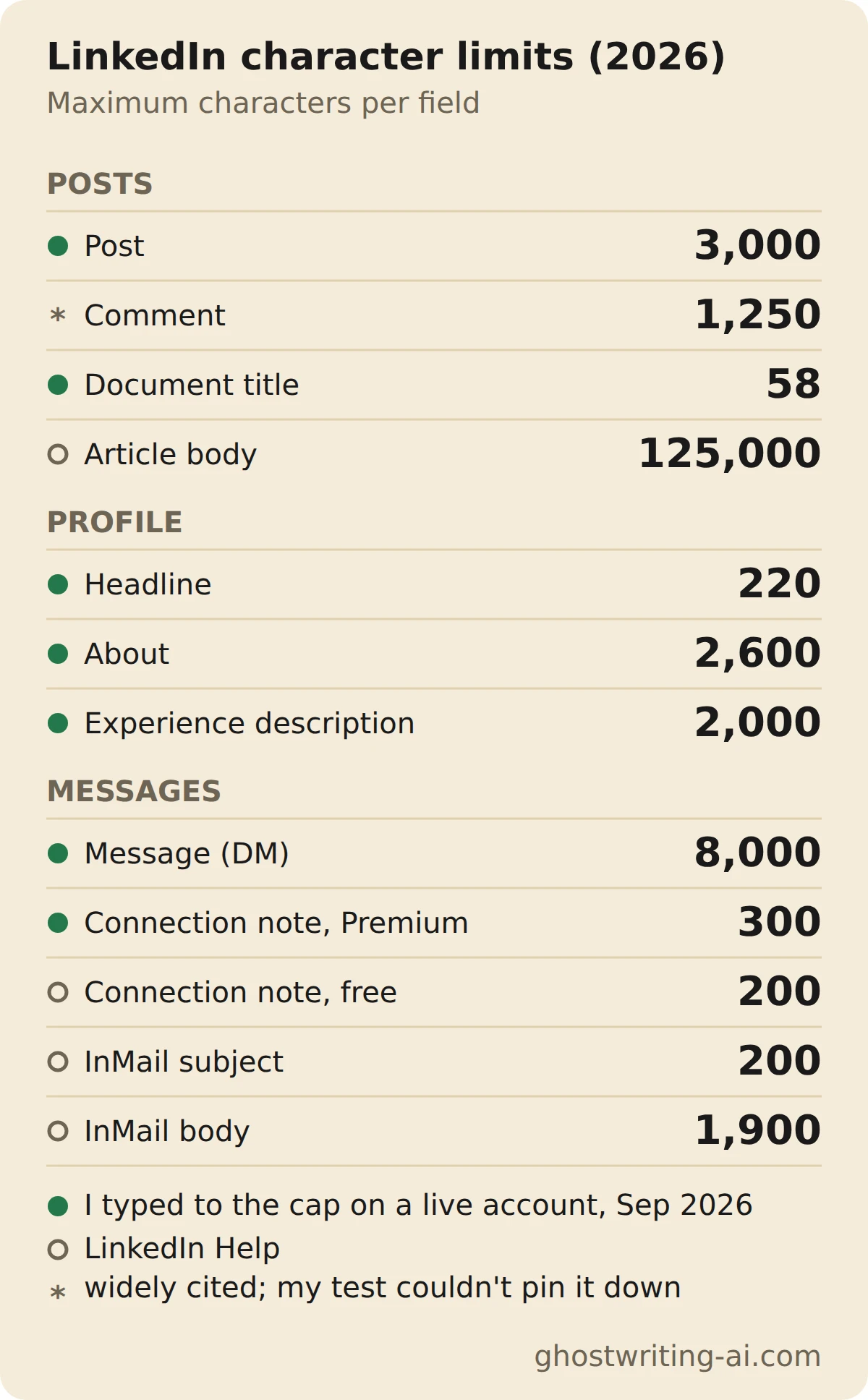
Quick answer: A LinkedIn post can be up to 3,000 characters. Your headline gets 220, your About section 2,600, each job description 2,000, a direct message 8,000, and a connection request note 200 on a free account or 300 on Premium.
I ghostwrote LinkedIn posts for about six years, and a few of these limits bit my clients more often than I'd like to admit. I pasted 10,000 characters into almost every text box on LinkedIn in September 2026 and wrote down where each one stopped. Where I couldn't test a field myself, the number comes from LinkedIn Help and the table links the page. Most guides don't source their numbers at all, and a few of the ones they repeat are wrong.
Every LinkedIn character limit
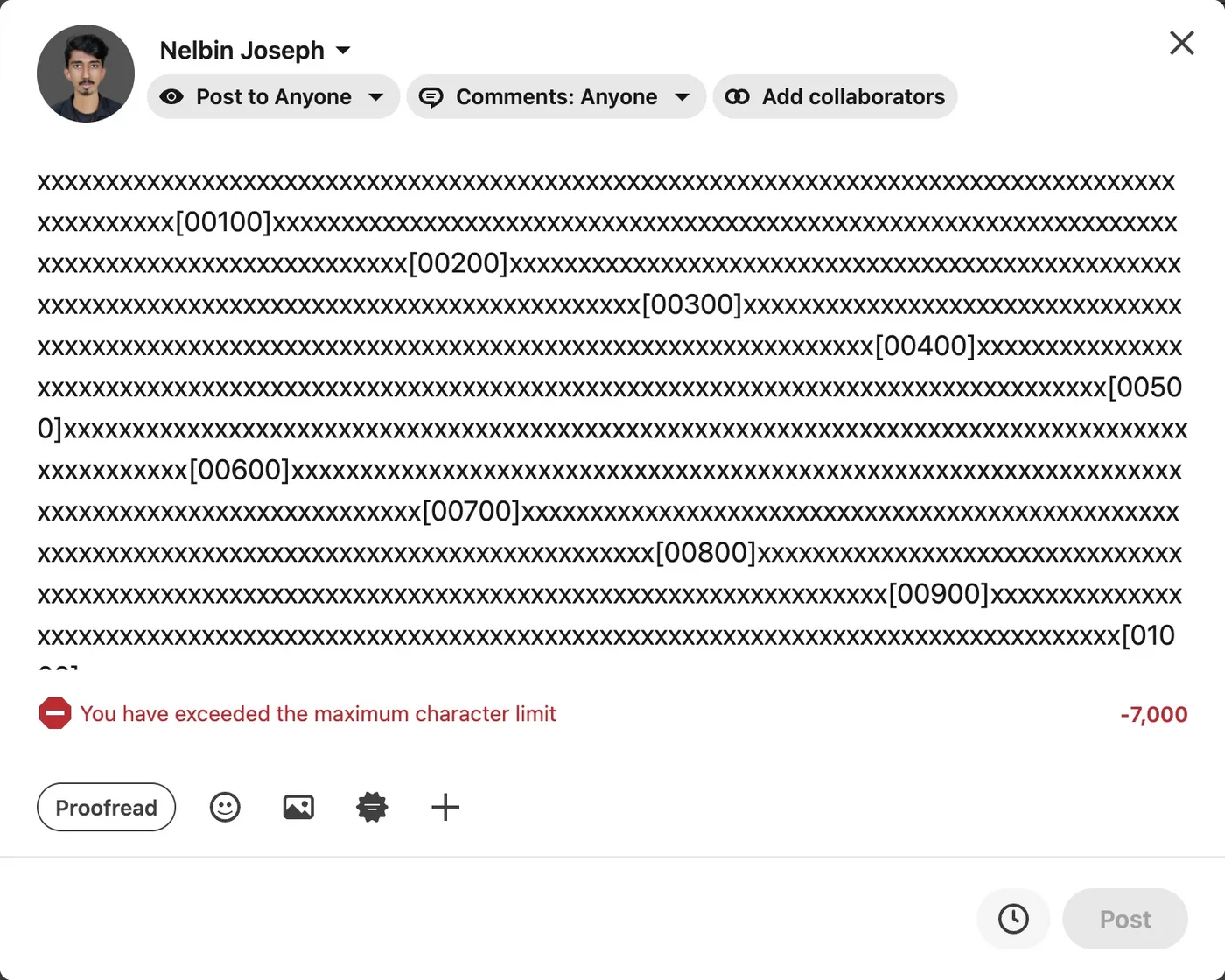
Posts get 3,000 characters and articles 125,000; almost everything else is far shorter. "Measured by me" means I hit the cap in LinkedIn's own editor and screenshotted the counter.
| Field | Character limit | Source |
|---|---|---|
| Post (profile or company page) | 3,000 | Measured by me, Sep 2026 · https://www.linkedin.com/help/linkedin/answer/a528176 |
| Headline | 220 | Measured by me, Sep 2026 |
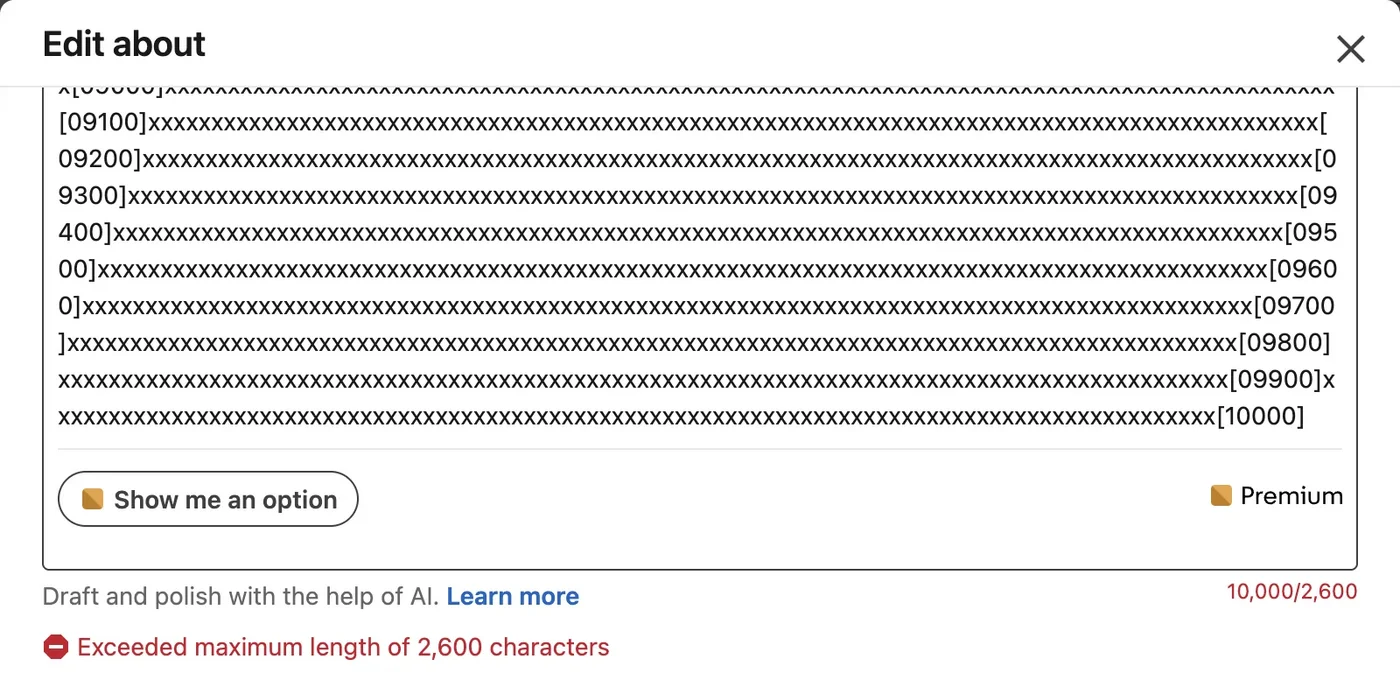
| About section | 2,600 | Measured by me, Sep 2026 |
| Experience description (per role) | 2,000 | Measured by me, Sep 2026 |
| Comment | 1,250 | LinkedIn doesn't publish it; this is the limit most tools use |
| Direct message | 8,000 | Measured by me, Sep 2026 |
| Connection request note (free) | 200 | LinkedIn Help a563153 |
| Connection request note (Premium) | 300 | Measured by me, Sep 2026 |
| InMail subject | 200 | LinkedIn Help a411986 |
| InMail body | 1,900 | LinkedIn Help a411986 |
| Article body | 125,000 | LinkedIn Help a522483 |
| Document post title | 58 | Measured by me, Sep 2026 |
| Message ad subject / body | 60 / 1,500 | LinkedIn Help a425533 |
| Carousel ad card headline | 45 | LinkedIn Help a427022 |
Profile limits: headline, About and experience
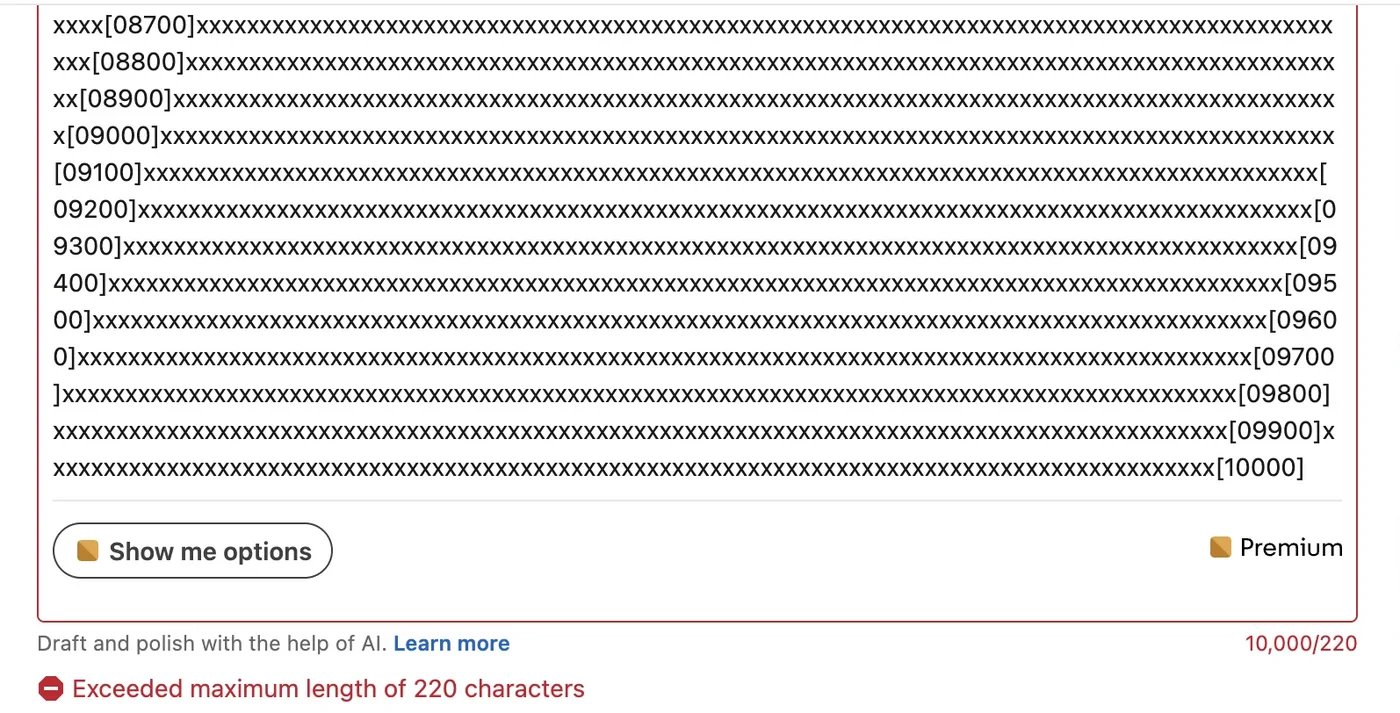
Your headline is capped at 220 characters, the About section at 2,600 and each role's description at 2,000. All three show a counter and an error message once you go over.
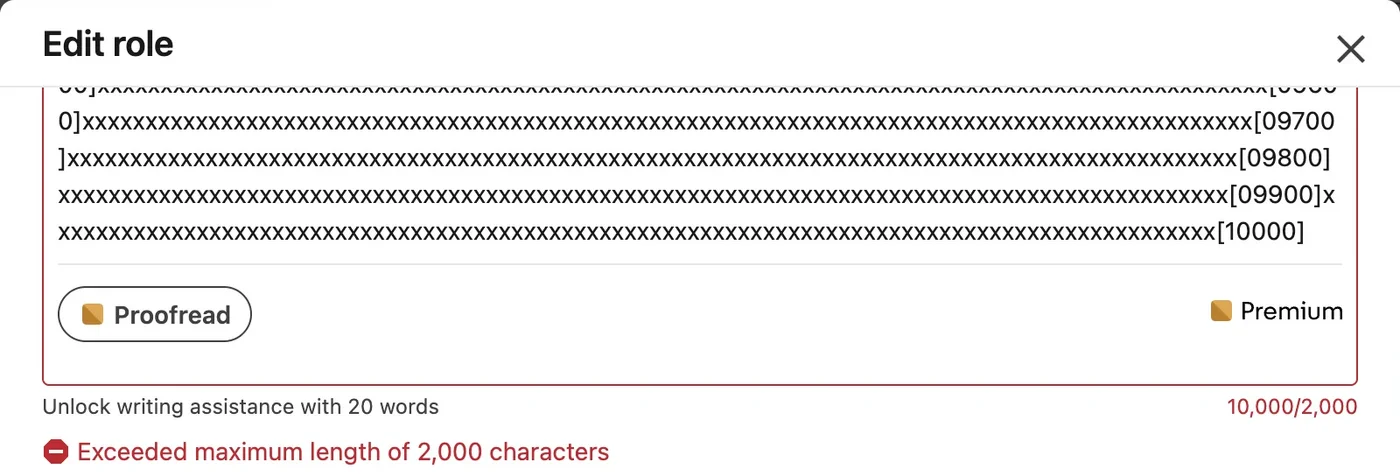
The headline is the one that matters most per character, because it follows you into every comment, search result and invitation. People see a shortened version in most of those places, so put the words that describe what you do at the front. A cybersecurity founder I wrote for had a headline that opened with his company's mission and only got to what he sold near the end of its 220 characters. In comment threads people saw the first few words, so they kept asking him what he actually did. We moved "Cloud security for banks" to the front and cut the rest to fit. The questions stopped.
Message limits: DMs, InMail and connection notes
A direct message to a connection can run 8,000 characters. An InMail gets a 200-character subject and a 1,900-character body. A connection request note gets 200 characters on a free account and 300 on Premium.
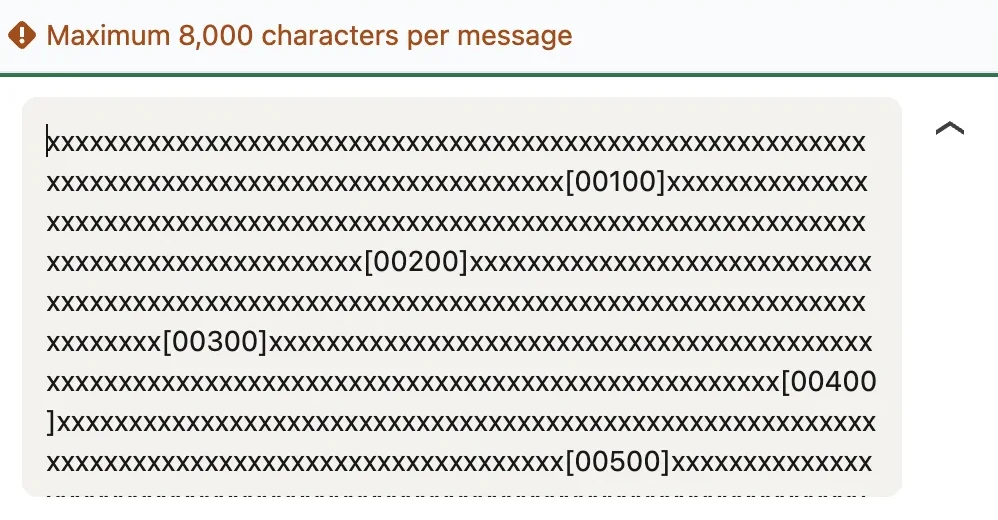
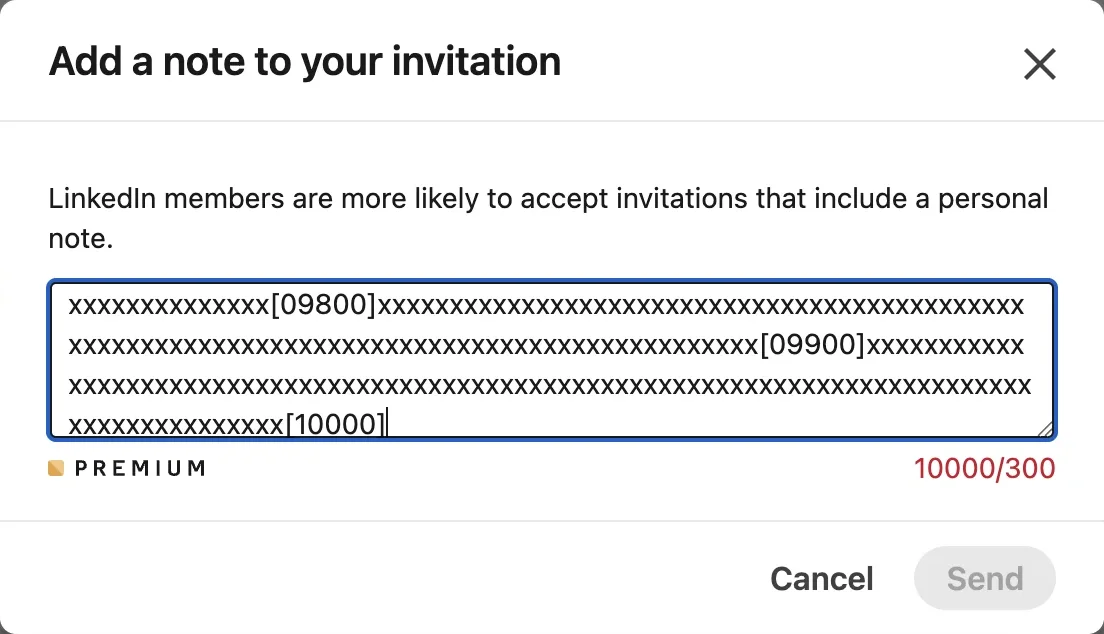
The connection note is the limit guides get wrong most often. They say 300, which is only true on Premium. LinkedIn Help says free accounts get 200 characters and only a limited number of personalized invitations each month. A 300-character note written on a free account won't fit. A sales leader I wrote for drafted his team's outreach note on Premium, then handed it to two SDRs on free accounts. It didn't fit in their box. We cut it to two sentences, the role and why them, and it worked fine.
How many characters show before "see more"?
LinkedIn doesn't publish a number. The cutoff moves with screen width and with your line breaks, so the same post gets cut in different places on a laptop and a phone. Any guide quoting an exact character count for the fold is quoting its own estimate. An executive coach I wrote for checked her hooks on a wide monitor, where three lines showed before the cutoff. On a phone the punchline landed below "… more". After that we read every draft on a phone before it went out.

The practical rule: whatever you want read has to fit in your first line or two. Check how yours breaks on desktop and phone in the post preview tool before you publish.
What counts as a character on LinkedIn?
Everything you type counts: letters, spaces, punctuation, line breaks, emojis and links. When you're within a few dozen characters of a limit, paste the text into a counter instead of guessing.
Does post length affect engagement?
Yes, at the short end. I analyzed 24,745 LinkedIn posts and compared each one with its author's typical post. Posts under 300 characters got 17% fewer likes and 27% fewer comments than the author's norm. Posts between 2,500 and 3,000 characters got 13% more likes. Everything from 600 to 2,500 characters performed about the same.
- Likes
- Comments
| Post length | Likes | Comments |
|---|---|---|
| 0–300 chars | 0.83× | 0.73× |
| 300–600 | 0.95× | 0.96× |
| 600–900 | 1.00× | 1.00× |
| 900–1,300 | 1.00× | 1.00× |
| 1,300–1,800 | 1.02× | 1.03× |
| 1,800–2,500 | 1.01× | 1.00× |
| 2,500–3,000 | 1.13× | 1.09× |
Source: Oiti analysis of 24,745 LinkedIn posts
Line count tells the same story. Posts under 10 lines got 15% fewer likes and 21% fewer comments than their author's norm, while everything from 10 lines up sat within 5% of it.
- Likes
- Comments
| Lines in the post | Likes | Comments |
|---|---|---|
| Under 10 lines | 0.85× | 0.79× |
| 10–20 | 1.00× | 1.00× |
| 20–35 | 1.02× | 1.03× |
| 35–55 | 1.02× | 1.05× |
| 55+ | 1.04× | 1.02× |
Source: Oiti analysis of 24,745 LinkedIn posts
Two things made no difference at all:
- One-line-per-sentence "broetry" vs dense paragraphs. Average line length didn't move likes or comments; every style landed within 2% of the author's norm. Break your lines however you like to read them.
- Hook length. A 10-character first line and a 300-character first line performed the same.
So don't pad a post to hit a number, but don't be afraid of the full 3,000 either. A short post leaves readers little to react to, and it shows most in the comments. If you want line breaks for readability, the text post formatter adds them cleanly.
What to do when you need more than 3,000 characters
Cut first. Most posts over the limit have a paragraph that repeats the one before it. A bakery-chain founder I wrote for once sent me a draft of nearly 4,000 characters about the week his main kitchen flooded before Christmas. Almost everything we cut came from two paragraphs that repeated the one before them. The trimmed version was his best post that year. If it really needs the space:
- Write an article. Articles take 125,000 characters, and LinkedIn Help describes them as typically longer than posts.
- Turn it into a document post. A PDF can run up to 300 pages; see LinkedIn carousel size for the right page dimensions.
- Split it into two posts. Publish part two the next day. Posting twice within 12 hours cost 16% of likes in my data, so give it the gap.
Where other guides get it wrong
These numbers get repeated across the top results and in Google's AI answer, and LinkedIn's own help pages say otherwise:
- InMail body is 1,900 characters, not 2,000. LinkedIn Help a411986.
- Articles hold 125,000 characters, not 110,000. LinkedIn Help a522483.
- Free connection notes are 200 characters, not 300. LinkedIn Help a563153. 300 is Premium.
- Company page posts get the same 3,000 as personal posts, not 700. LinkedIn Help a528176.
- Article titles: you'll see both 100 and 150 quoted. LinkedIn doesn't publish one, so treat either as a guess.
The cheat sheet
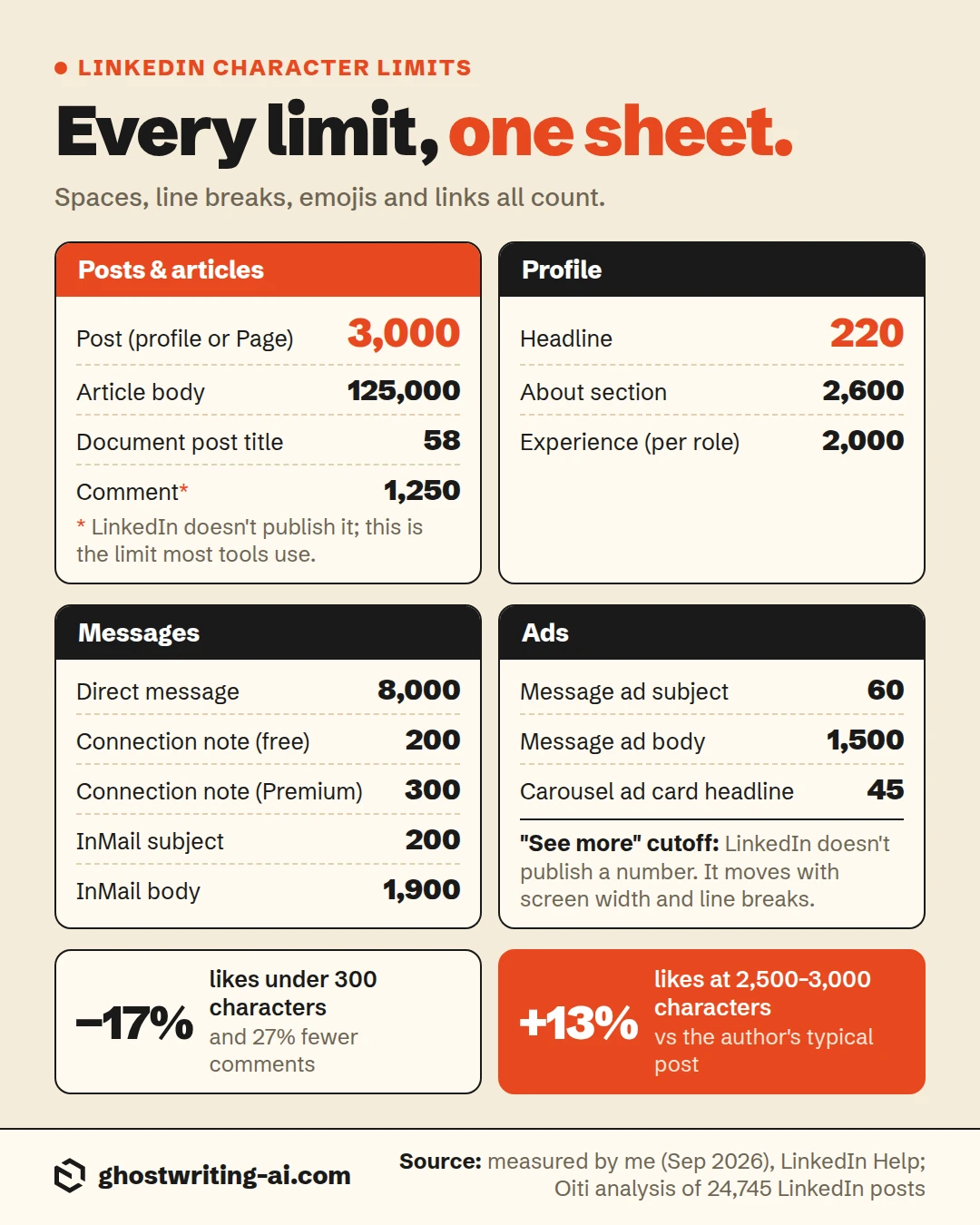
The bottom line on LinkedIn character limits
A post gets 3,000 characters, a headline 220, the About section 2,600, and a connection note 200 on a free account or 300 on Premium. The mistake I see most is trusting a number from a blog post over the counter in the box you're typing in, because a lot of the figures floating around belong to a different field or a paid plan. And stop trimming good posts to look snappy. In my data, the very short ones were the ones that lost.
A patent attorney I wrote for pasted the bio from his firm's website into his About section, hit the limit, and deleted from the bottom until LinkedIn let him save. The bottom was the paragraph about which clients he took and how to reach him. It sat like that for most of a year, until a prospect messaged to ask whether he was taking new clients. If you have to cut to fit, cut from the middle.
Free character counter
Check your post before LinkedIn cuts it off
Paste your post, headline, About section, comment or message and see exactly how many characters you have left, and how far over you are, before you hit Post.
The feed shows about three lines on desktop and two on a phone, then hides the rest behind more.
0 words · 0 without spaces
Frequently asked questions
- What is the LinkedIn post character limit in 2026?
- 3,000 characters, for personal profiles and company pages alike. Spaces, line breaks and emojis all count toward it.
- What is the character limit for LinkedIn headlines?
- 220 characters. I tested it in September 2026: the headline field shows a counter and stops you at 220.
- How many characters can you put in a LinkedIn connection request?
- 200 on a free account and 300 on Premium. Free accounts also get only a limited number of personalized notes per month.
- How many characters show before "see more" on LinkedIn?
- LinkedIn doesn't publish a number. The feed cuts posts by lines, so it depends on your line breaks and screen size. Keep the point in your first line or two.
- Is 300 words too long for a LinkedIn post?
- No. 300 words is roughly 1,800 characters, well inside the 3,000 limit. In my analysis of 24,745 posts, anything from 600 to 2,500 characters performed about the same, and very short posts did worst.
- Is 500 words too long for a LinkedIn post?
- Not quite, but it's close to the limit. 500 words usually lands near 3,000 characters, so you may need to trim. Posts between 2,500 and 3,000 characters got 13% more likes than their author's norm in my data.
- How do I get around the LinkedIn character limit?
- Publish it as an article (125,000 characters) or a document post, or split it into two posts a day apart. There's no setting that raises the 3,000 cap.
- What is the LinkedIn comment character limit?
- 1,250 characters. LinkedIn doesn't publish an official figure; this is the limit most tools use. The comment box shows a negative counter once you go over.
Fill the 3,000 characters with something worth reading
Oiti is the AI clone for LinkedIn content. It learns the way you actually talk and what you believe, then drafts full-length posts that read like you typed them, ready to edit and schedule.
Start free7 days free.