LinkedIn analytics
What Are LinkedIn Impressions? What Counts and What's a Good Number (2026)

Aitijya Sarkar · Updated
Founder - Oiti | LinkedIn ghostwriting | 100M+ views
Quick answer: A LinkedIn impression is one time your post was shown on someone's screen, whether or not they did anything with it. LinkedIn counts repeats, so one person who scrolls past twice gives you two impressions. Across a 6,651-post dataset, the median post got 581 impressions.
I ghostwrote LinkedIn posts for about six years, and those posts have passed 100M views between them. The message I got most from clients was a screenshot of an impressions count with a question mark under it, and impressions are still the number I see people misread most. An impression doesn't mean someone read your post, or even that a new person saw it.
It means LinkedIn put the post on a screen. Once you know that, 500 stops looking like 500 readers, and the benchmarks below tell you whether it's a good 500.
What counts as an impression on LinkedIn
LinkedIn defines an impression as the "number of times your post was shown on LinkedIn." That's the entire definition on its post analytics help page. Nobody has to click, react or even stop scrolling.
Repeats count: if the same person sees your post in the morning and again after lunch, that's two impressions. LinkedIn also admits the numbers "are estimates and may not be precise," so read any single count as close rather than exact.
Here are the reach metrics under a post, in LinkedIn's words.
| Metric | LinkedIn's definition | Counts repeat views? |
|---|---|---|
| Impressions | "Number of times your post was shown on LinkedIn." | Yes |
| Members reached | "Number of distinct members and Pages that saw your post." An estimate. | No |
| In network | "Percentage of impressions from members who follow or are connected to you." | Share of impressions |
| Out of network | "Percentage of impressions from members who don't follow or aren't connected to you." | Share of impressions |
The same page lists the rest: reactions, comments, reposts, saves, sends, link visits, profile viewers and followers gained from the post, viewer demographics, and video views and watch time on video posts.
Impressions vs members reached vs views
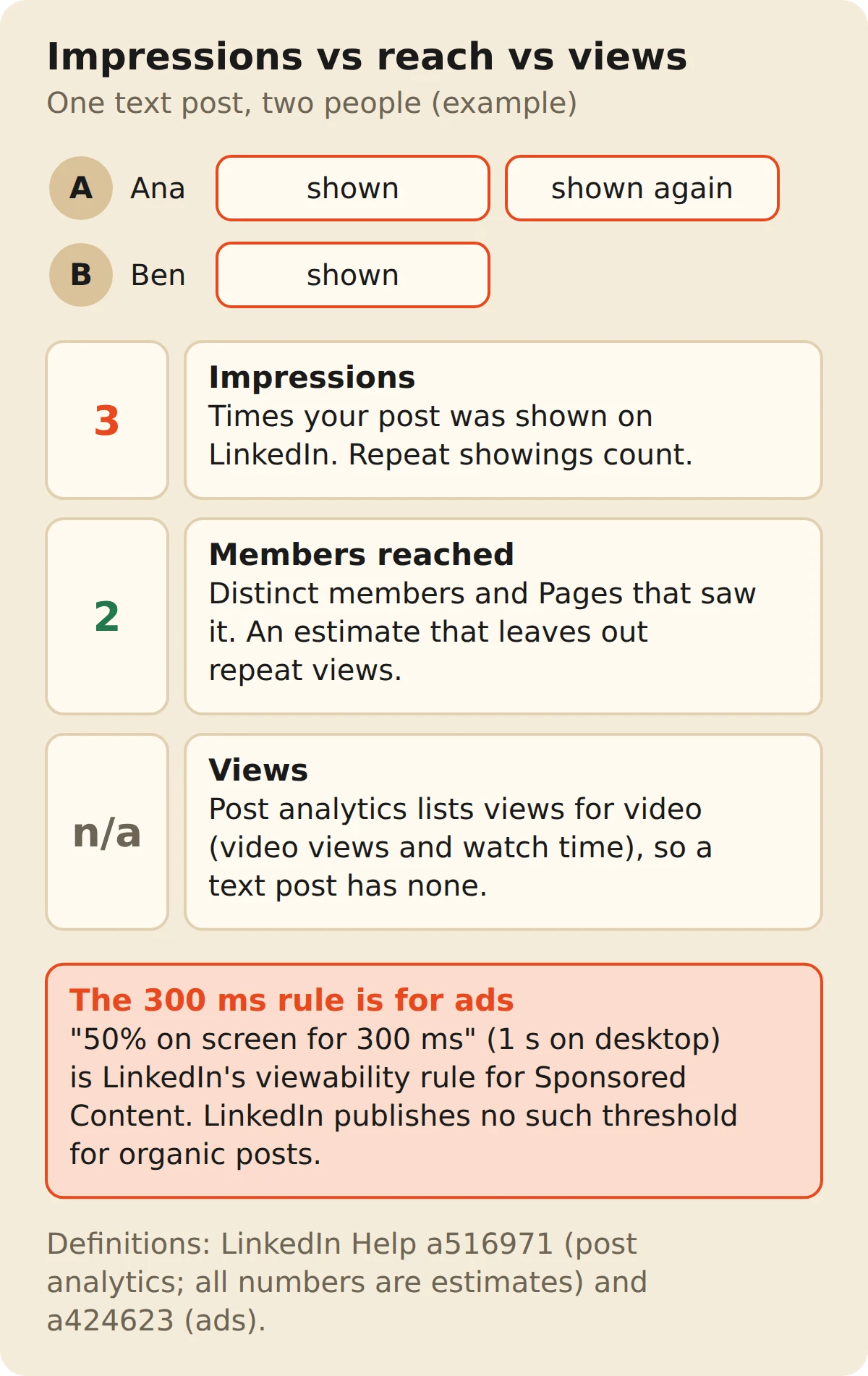
Impressions count showings, members reached counts people, and engagement counts actions, which is why impressions are always the biggest number.
| Metric | What it counts | One reader who sees your post twice and likes it |
|---|---|---|
| Impressions | Every time the post was shown | 2 |
| Members reached | Distinct members and Pages who saw it | 1 |
| Engagement | Reactions, comments, reposts | 1 |
| Video views | Views of the video in a video post (video posts only) | Depends on the video |
"Views" trips people up. Text, image and document posts have no separate views number, so a post that "got 2,000 views" almost always got 2,000 impressions. Video posts are the exception, with their own video views and watch time on top.
Divide impressions by members reached to see how often the same people saw you. At 3,000 impressions and 2,000 members reached, the average reader saw the post 1.5 times. A high ratio often means your own network kept running into it.
A VC I wrote for once forwarded me a post with about double his usual impressions and the subject line "breakout?"
Members reached had barely moved. The post had started a long comment fight among founders he'd backed, and every reply pushed it back in front of the same few hundred people.
Good post for his network. It just never left it.
In network vs out of network impressions
In-network is the share of your impressions from people who follow or are connected to you. Out of network is everyone else. The two add up to 100%.
If you want to grow, watch out of network: those are strangers LinkedIn decided to show you to. Its March 2026 engineering post on the feed explains how. LLM-generated embeddings match what a post is about to what a member engages with, inside and outside their network, and a ranking model scores the candidates against more than a thousand of that member's past interactions.
A nonprofit executive director I wrote for spent her first year posting thank-yous to donors and staff, and nearly all of her impressions came from people who already followed her. The first post that travelled was a plain explainer on why overhead ratios are a bad way to judge a charity.
Most of its impressions came from people who'd never heard of her organization.
A post with a clear topic gives that retrieval step something to match. A vague one leaves it guessing. If your out-of-network share is stuck in single digits, sharpen the topic before you reach for hashtags. The LinkedIn algorithm guide covers the ranking side.
Source: LinkedIn Engineering: Engineering the next generation of LinkedIn's Feed (Mar 12, 2026).
What is a good number of impressions on LinkedIn?
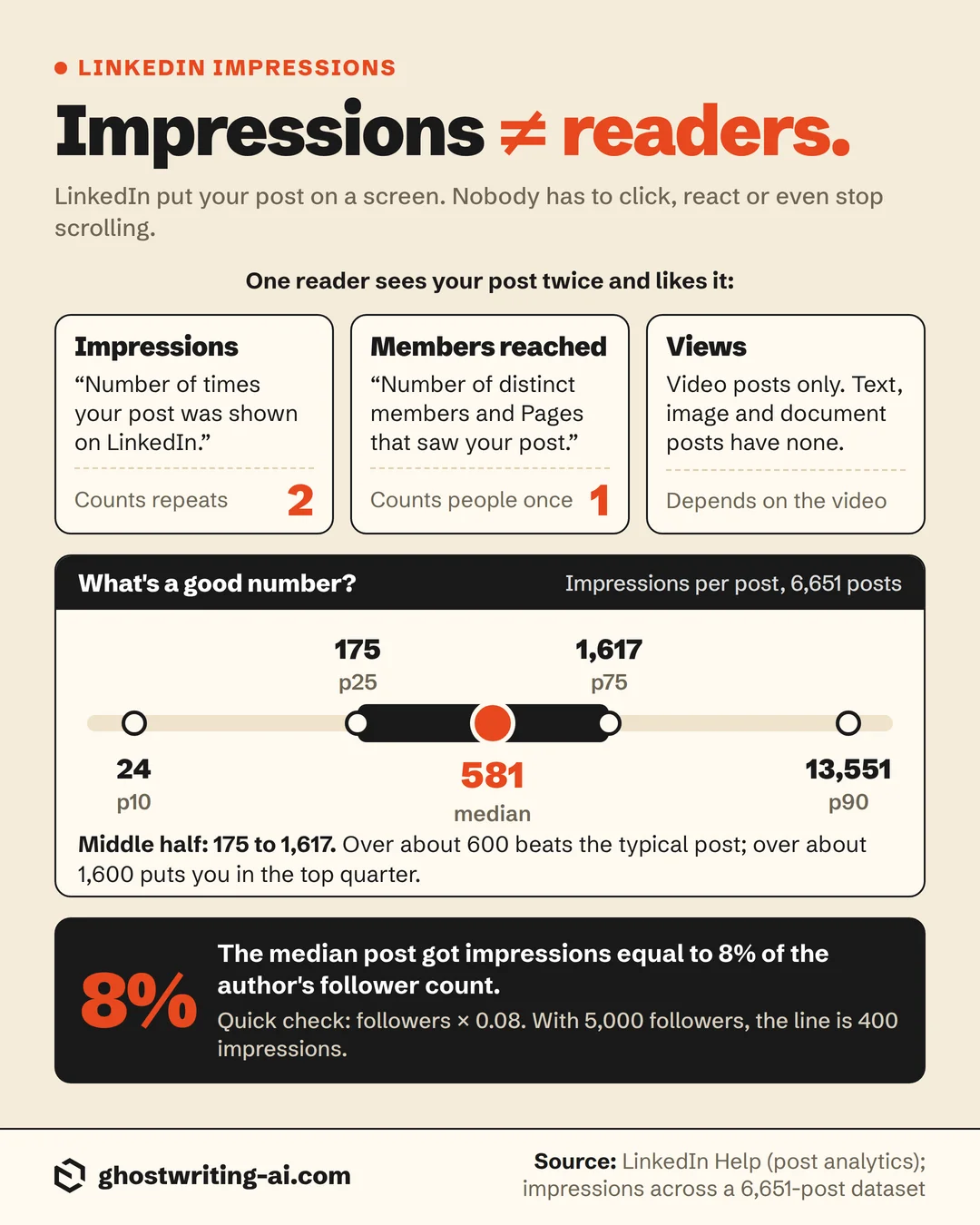
Across a 6,651-post dataset, the median LinkedIn post got 581 impressions, the middle half landed between 175 and 1,617, and the top 10% cleared 13,551. So anything over about 600 beats the typical post, and anything over about 1,600 puts you in the top quarter.
The counts are LinkedIn's own, pulled for personal-profile posts through its official analytics API.
Impressions per post (log scale)
| Percentile | Impressions per post |
|---|---|
| p10 | 24 |
| p25 | 175 |
| p50 (median) | 581 |
| p75 | 1,617 |
| p90 | 13,551 |
Source: Impressions per post across a 6,651-post dataset
| Where your post lands | Impressions per post |
|---|---|
| Bottom 10% | Under 24 |
| Bottom quarter | Under 175 |
| Median | 581 |
| Top quarter | Over 1,617 |
| Top 10% | Over 13,551 |
The jump from the 75th to the 90th percentile, 1,617 to 13,551, is the long tail. Most posts land in a narrow range and a few break out by an order of magnitude. If one post does ten times your usual number while your follower count stays flat, open its analytics and check the out of network share first.
Raw counts track audience size, so a fairer test is impressions as a share of followers. The median post got impressions equal to 8% of the author's follower count, the top quarter 19% or more, and the top 10% 47% or more. For accounts with 5,000 to 20,000 followers the median was 7.6%.
| Impressions as a share of followers | All posts | Accounts with 5,000–20,000 followers |
|---|---|---|
| p25 | 2.5% | 2.9% |
| Median | 8.0% | 7.6% |
| p75 | 19.3% | 16.1% |
| p90 | 47.3% | 44.4% |
Quick check: multiply your follower count by 0.08. Beat that and the post did better than the typical one here. With 5,000 followers, the line is 400 impressions.
Is 100, 200, 500, 1,000 or 10,000 impressions good?
Yes for 1,000 and 10,000, about average for 500, and below the typical post for 100 and 200. Against the 6,651-post dataset:
- 100 impressions. Between the 10th and 25th percentile, so bottom quarter. Normal for a small or new account, worth a look if you usually get more.
- 200 impressions. Just above the 25th percentile (175). Below typical, but not unusual.
- 500 impressions. Just under the median of 581. Middle of the pack.
- 1,000 impressions. Between the median and the 75th percentile (1,617). Better than most.
- 10,000 impressions. Past the 75th percentile and closing in on the 90th (13,551). For most accounts that means the post travelled well outside your network.
Your follower count changes the reading. 1,000 impressions on a 1,500-follower account is 67% of followers, which is above the top-10% share. 1,000 on a 40,000-follower account is 2.5%, right at the line for the bottom quarter.
A dentist who ran three clinics once sent me a sad note about a post that "only" got 700 impressions. He had about 900 followers, which put that post well past the top-10% share, and I told him so. After that we compared him with his own last ten posts instead of the creators in his feed.
Are LinkedIn impressions real?
Yes, in that LinkedIn counts actual showings of your post. They mislead because a showing isn't a reader. LinkedIn calls the numbers estimates, repeats count, and with no published minimum time for organic posts, a fast scroll past your first line still counts.
Hence the Reddit threads saying "LinkedIn impressions are not real." Someone sees 3,000 impressions and 4 reactions and assumes the count is inflated. Usually the post really was shown 3,000 times and the first line didn't stop anyone. Impressions measure distribution. Whether the post was any good shows up in reactions, comments, saves and sends.
A recruiter I wrote for in 2022 was sure LinkedIn was padding her numbers. A post about the hiring market showed a few thousand impressions and a handful of reactions. We rewrote only the opening line, swapping a warm-up sentence for the question her candidates kept asking her, and ran it again a few weeks later. Impressions came in about the same. Reactions were several times higher.
Why your LinkedIn impressions dropped
A drop usually means LinkedIn is showing your posts to fewer people outside your network, or something changed in how you post. Some of it isn't you, though. Check in this order.
- LinkedIn is selling more of the feed. Companies can boost any Page post, and Thought Leader Ads let them pay to push a person's own post into feeds. Every sponsored post takes a slot an organic one used to fill, and on the accounts I've worked on, organic impressions have drifted down as more of the feed went to paid posts. If every post fell by about the same amount at the same time, that's the feed, not you. Judge yourself against your recent median, not last year's.
- Your out-of-network share fell. Compare the in network / out of network split on recent posts with older ones. If out of network shrank, the posts matched fewer people's interests, usually because the topic drifted.
- You're posting too close together. In my analysis of 24,745 posts, a post published within 12 hours of the author's previous one got 16% fewer likes than that author's median.
- Your posts got shorter. Posts under 300 characters got 17% fewer likes and 27% fewer comments than the author's median in the same data. Give readers something to react to.
- You changed things that don't matter. Posts with links came out at 0.97 of the author's median, and hashtag count showed no consistent effect, so look elsewhere first.
- Compare like with like. One breakout post makes the next five look like a collapse. Measure against your median, not your best.
How to get more impressions on LinkedIn
Give each post a clear topic and enough substance, and post consistently without stacking posts close together. My data and LinkedIn's own feed description both back those levers.
- Make the topic obvious. LinkedIn matches posts to readers by topic, so say it plainly and early.
- Don't go too short. Posts between 2,500 and 3,000 characters got 13% more likes than the author's median in my data, and posts under 300 got 17% fewer. The LinkedIn character limits guide covers where the "see more" cut falls.
- Leave 12 hours between posts. Anything closer cost 16% of likes.
- Don't obsess over the hour. Day and hour made almost no difference once each author is compared with their own median. The best time to post guide has the breakdown.
- Post more often. More posts, more shots at the out-of-network tail. If writing is the bottleneck, the free LinkedIn post generator gives you a first draft.
How to see your LinkedIn impressions
- 01
Open the post
From your profile, go to Activity, then Posts, and pick one.
- 02
Click the impressions count
It's under the post, next to "View analytics." Either one opens the analytics.
- 03
Read the discovery numbers
Impressions and members reached are at the top, with the in network and out of network split beside them.
- 04
Scroll for engagement and audience
Reactions, comments, reposts, saves and sends come next, then viewers by job title, company and location.
Only the author sees these numbers. On someone else's post you get the public reaction and comment counts.
The cheat sheet
The bottom line on LinkedIn impressions
An impression is a showing, not a reader. LinkedIn counts every time your post lands on a screen, repeats included, and the median post in a 6,651-post dataset got 581.
Judge a post against your own follower count, where about 8% is typical, and check the out of network share when you want to know whether it travelled. If reactions lag far behind impressions, the first line is the problem, not the count. One breakout post shouldn't become the bar for the next ten.
A logistics founder I wrote for used to open our calls by reading out other creators' numbers. I asked him to read his own last ten posts instead, against his own 8% line. Most of them cleared it, and the other creators stopped coming up after that.
Free calculator
Turn your impressions into an engagement rate
Impressions count showings. Engagement rate is the share of those showings that turned into a reaction, comment or repost. Paste your post analytics numbers and get the rate against impressions and against followers, with the working shown.
Open the engagement rate calculatorFrequently asked questions
- What are impressions on LinkedIn?
- One time your post was shown on screen. LinkedIn defines impressions as the "number of times your post was shown on LinkedIn." Nobody has to click or react, and repeat showings to the same person count again.
- What is a good number of impressions on LinkedIn?
- Anything over the median of 581 impressions, across a 6,651-post dataset. Over 1,617 puts a post in the top quarter. Relative to followers, the median post got impressions equal to 8% of the author's follower count.
- Is 1,000 impressions on LinkedIn good?
- Yes. It beats the median post (581) and sits between the 50th and 75th percentile. Excellent on a small account, below typical on one with tens of thousands of followers.
- Are LinkedIn impressions the same as views?
- In practice yes, for text, image and document posts: LinkedIn doesn't report a separate views number, so "views" usually means impressions. Video posts add separate video views and watch time.
- What is the difference between impressions and members reached?
- Impressions count every time your post was shown. Members reached counts distinct members and Pages who saw it, so one person seeing your post three times is three impressions and one member reached.
- Is 10,000 impressions a lot on LinkedIn?
- Yes. 10,000 is well past the 75th percentile (1,617) and close to the top 10% (13,551) in a 6,651-post dataset. For most accounts that means it reached well outside your network.
- Does LinkedIn count an impression after 300 milliseconds?
- Not officially, for your own posts. LinkedIn documents the 50% in view for 300 milliseconds rule for Sponsored Content ads on mobile (1 second on desktop). Its help page for organic posts defines impressions only as times the post was shown, with no published threshold.
- Why did my LinkedIn impressions drop?
- Usually because fewer people outside your network were shown the post, and part of that is LinkedIn giving more of the feed to sponsored and boosted posts. Check the out of network share in post analytics, how close together you've been posting, and whether your posts got much shorter.
More posts, more chances at a breakout
Impressions grow when you post consistently with a clear point of view. Oiti is the AI clone for LinkedIn content: it learns how you actually write and what you believe, drafts posts that read like you typed them, and its analytics track impressions, reach and followers across your last 12 months.
Start free7 days free.