I Tried MagicPost vs Taplio: Features, Pricing, Cons, Which Is Better (2026)?
Taplio does more. MagicPost is cheaper, safer for your account, and far better liked. But both make you sound like AI slop.

I've spent close to six years ghostwriting LinkedIn content for 50 to 60 founders, consultants, and CXOs across most B2B niches there are — north of 100 million organic views between them. So I've run tools like these across dozens of client accounts, and I've tried both of these on both client and my own accounts.
Between MagicPost and Taplio, Taplio is the more capable tool in 2026 — its million-plus-post inspiration library, analytics, and outbound stack do more than MagicPost's leaner writer and preview. But MagicPost wins the three things you feel month to month: it's cheaper, it publishes through LinkedIn's official API instead of the Chrome-extension automation that got Taplio banned from the platform, and it holds a 4.7 out of 5 on Trustpilot against Taplio's 2.0. Taplio takes the overall call on breadth, and it edges the writing surface too. Price, account safety, and reputation all go to MagicPost.
Both share one flaw either way — neither remembers who you are between sessions or looks anything up before drafting, so the writing slides generic and both make you sound like AI slop. If what you want is posts grounded in your unique POV and voice, the tool I'd point you to is Oiti, the AI clone for LinkedIn content.
MagicPost vs Taplio at a glance
| MagicPost | Taplio | Oiti — AI clone for LinkedIn contentMy pick | |
|---|---|---|---|
| Best for | A cheap, ToS-safe AI writer with a LinkedIn preview | An all-in-one content, inspiration, and outbound stack | Posts grounded in your POV, not templated AI slop |
| Starting price | $29/mo Starter (list $49) · $39/mo Creator, unlimited posts | $39/mo Starter (AI heavily capped) · $69/mo Growth (the AI tier) · $199/mo Pro | $49/mo Creator · $79/mo Pro |
| Real price for the AI writing | $29 on Starter, capped at 20 posts a month; $39 unlimited | $69 — Starter's AI is capped hard and you can't buy more credits | $49 / $79 |
| Free trial | Trial via signup, then paid | 7-day, full app access | 7-day, no usage caps |
| LinkedIn's terms of service | Safe — official API, no extension | Risky — Chrome-extension automation; Taplio is banned from LinkedIn | Safe — official LinkedIn Marketing APIs |
| Standout strength | Price, account safety, and a 4.7/5 across 91 Trustpilot reviews | The million-plus-post inspiration library and sheer breadth | Long-term memory + Knowledge Base grounded in your POV |
| Biggest weakness | Form-based input with no iteration; inspiration paywalled | Generic AI output, puts your account at risk, overpriced for content alone | LinkedIn-first; no outbound, no native mobile app |
| Overall winner | — | ✓ (does more) | — (parallel pick, not the referee) |
Prices captured May 2026 from each vendor's own pricing page. MagicPost takes price, account safety, and reputation. Taplio's overall ✓ rests on one thing — it does more.
How I Tested MagicPost v/s Taplio — My Testing Methodology
I tried both tools on both client and my own accounts. I tried Taplio back in 2021, for about two months, when it was one of the only real tools on the market and I was growing my own account. I signed up and logged back in again this year, and found almost nothing had changed except a chatbot bolted on top.
MagicPost I signed up for when they launched, after an influencer post crossed my feed, and I walked the whole onboarding and content flow.
Here's what I weighed — and I weight safety and price highest, because those are the two that hurt most when you get them wrong:
Value for money
The real price of the AI content, not the sticker on the cheapest tier.
AI content quality
How close a first draft gets before I have to rewrite the whole thing.
Features & breadth
Inspiration library, analytics, outbound, scheduling: how much each tool actually does.
LinkedIn's terms of service
Official API vs Chrome-extension automation, and what that does to your account.
Reputation
What paying customers publicly say once the bill has run a few months.
What Is MagicPost – the AI LinkedIn Post Generator That's 10x Faster?
MagicPost (magicpost.in) is a LinkedIn writer that runs on LinkedIn's official API. Its homepage leads with a “LinkedIn-verified partner” badge, a “Join 100k+ users” line, and the pitch “everything you need to grow on LinkedIn, in one place.” In practice it's a form-driven post generator, a hooks and ideas generator, an editor with a LinkedIn preview, a scheduling calendar, and basic metrics. No browser extension anywhere in it. The promo pricing runs aggressive, you get a trial off the signup before it asks for money, and the product stays in one lane: write a post, see how it'll look, schedule it.

What Is Taplio – the AI Tool to Grow on LinkedIn in 10 Min/Day?
Taplio (taplio.com) is the veteran all-in-one, built by the TweetHunter team and later acquired by Lemlist. It pitches itself as “your AI coach for LinkedIn growth.” One paid stack bundles AI writing through a “Chat Assist” panel, a searchable library of well over a million viral posts, scheduling, analytics, a contacts database, and outbound plus comment automation driven by the free “Taplio X” Chrome extension. It's trying to be your whole LinkedIn operation rather than your writer, and the extension that powers the automation half is the same thing that carries the account risk.
Now on to testing both platforms, dimension by dimension. First up: which one is actually the better deal?
1. MagicPost vs Taplio Pricing: What's the Best Value for Money?
MagicPost wins this one outright, and where Taplio gates the AI is the reason.
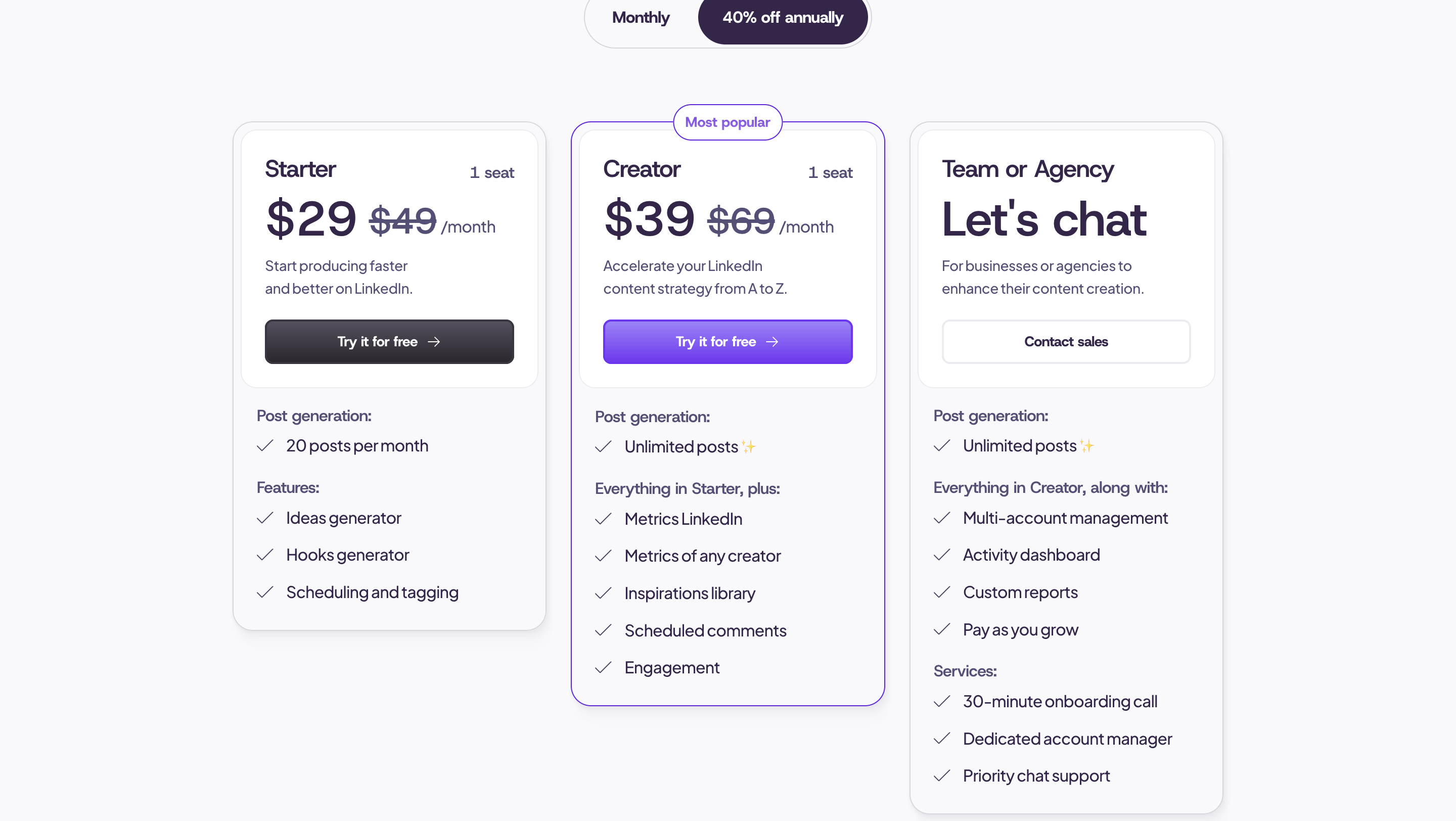
When I jumped into MagicPost, its Starter was $29 a month against a $49 list price — 20 posts a month, the ideas and hooks generators, and scheduling. Creator, the one marked most popular, is $39 against a $69 list, and it lifts the cap to unlimited posts and adds the inspirations library, LinkedIn metrics, scheduled comments, and engagement.
Then I opened Taplio's pricing, expecting the AI on the entry tier. I was wrong. Its $39 Starter — the same price as MagicPost's unlimited plan — caps the AI hard enough that you can't lean on it, and there's no way to buy more credits. What that card actually sells you is scheduling, core-metric analytics, and posting consistency. You don't get to write with AI until the $69/mo Growth plan, and the outbound and lead automation is $199 Pro.
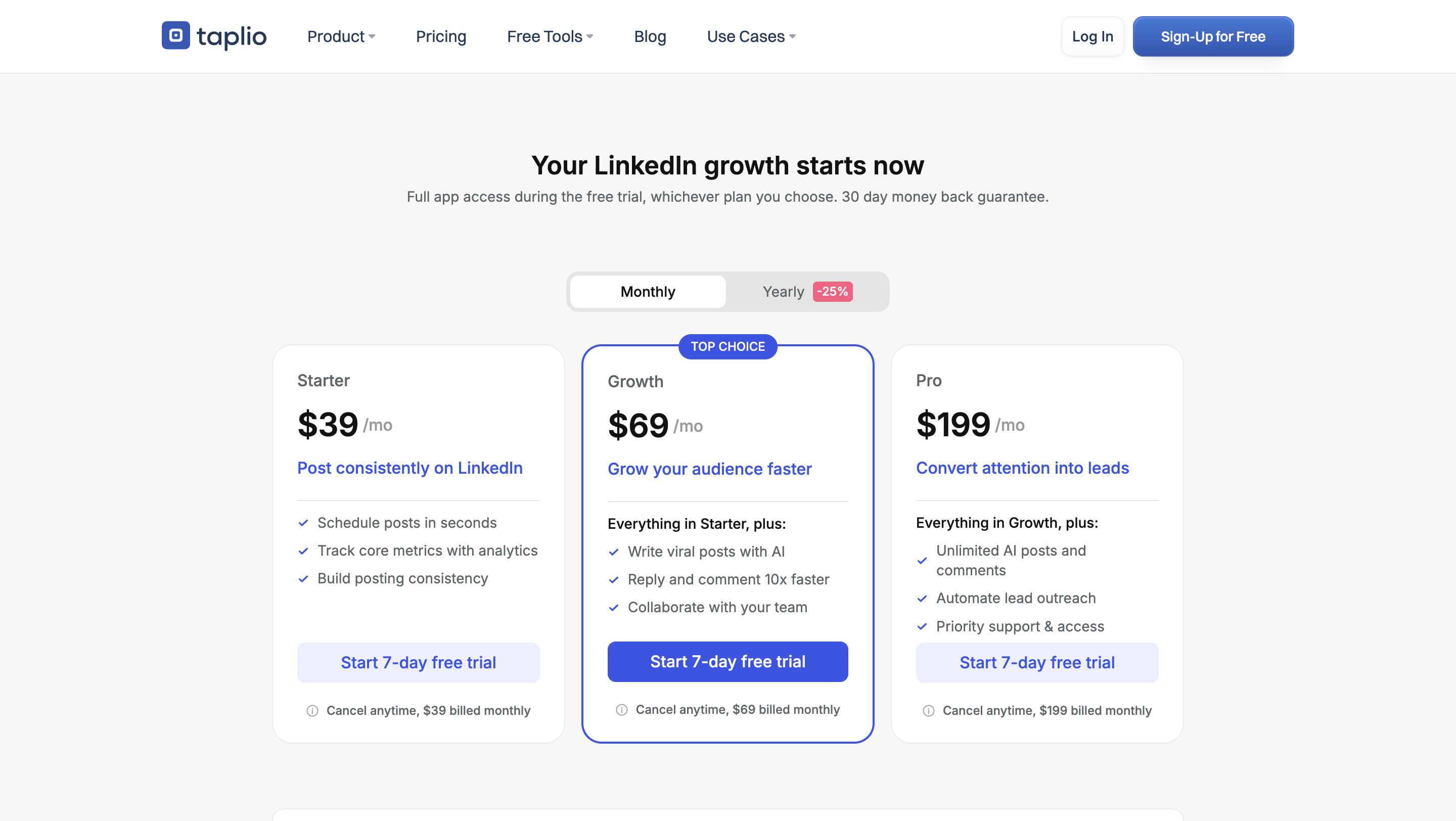
So writer to writer, it's $39 for unlimited AI posts against $69 for the tier where Taplio actually sells you the AI. Close to half the price for the thing most people are buying. Here's Pawel on Capterra, on how the Taplio bill feels a few months in:
“It's quite expensive, and some of its features don't seem that helpful in retrospect.”
With Taplio you're paying outbound-and-automation prices for what is, for most solo creators, a content tool. If content is all you want, that math never comes out in Taplio's favour.
Winner: MagicPost.
Cheap and generic is still generic, though. At $49/mo, Oiti writes from your long-term memory and Knowledge Base instead of a form, so a draft starts in your POV rather than the templated middle. Try Oiti free for 7 days, no usage limits.
Stop overpaying for generic AI
Taplio charges outbound prices for a content tool. Oiti is $49/mo and writes in your POV from your memory + Knowledge Base — not templated slop.
7 days free · No usage limits
2. MagicPost vs Taplio Content: Which Tool's AI Content Is Better in 2026?
Next up, the big one: which tool’s AI content is actually better?
Taplio wins the writing surface narrowly, then both tools hit the same ceiling.
MagicPost's writer is a form. My first move: pick a post type (Actionable, Inspiring, Introspective) and a category, type a subject into a box, set tone and emoji parameters, press “Generate a post.” It handed me a draft, and my only options were accept or regenerate. There's no way to say “no, tighten that hook, cut the third line, that isn't how I'd phrase it” and watch it try again.
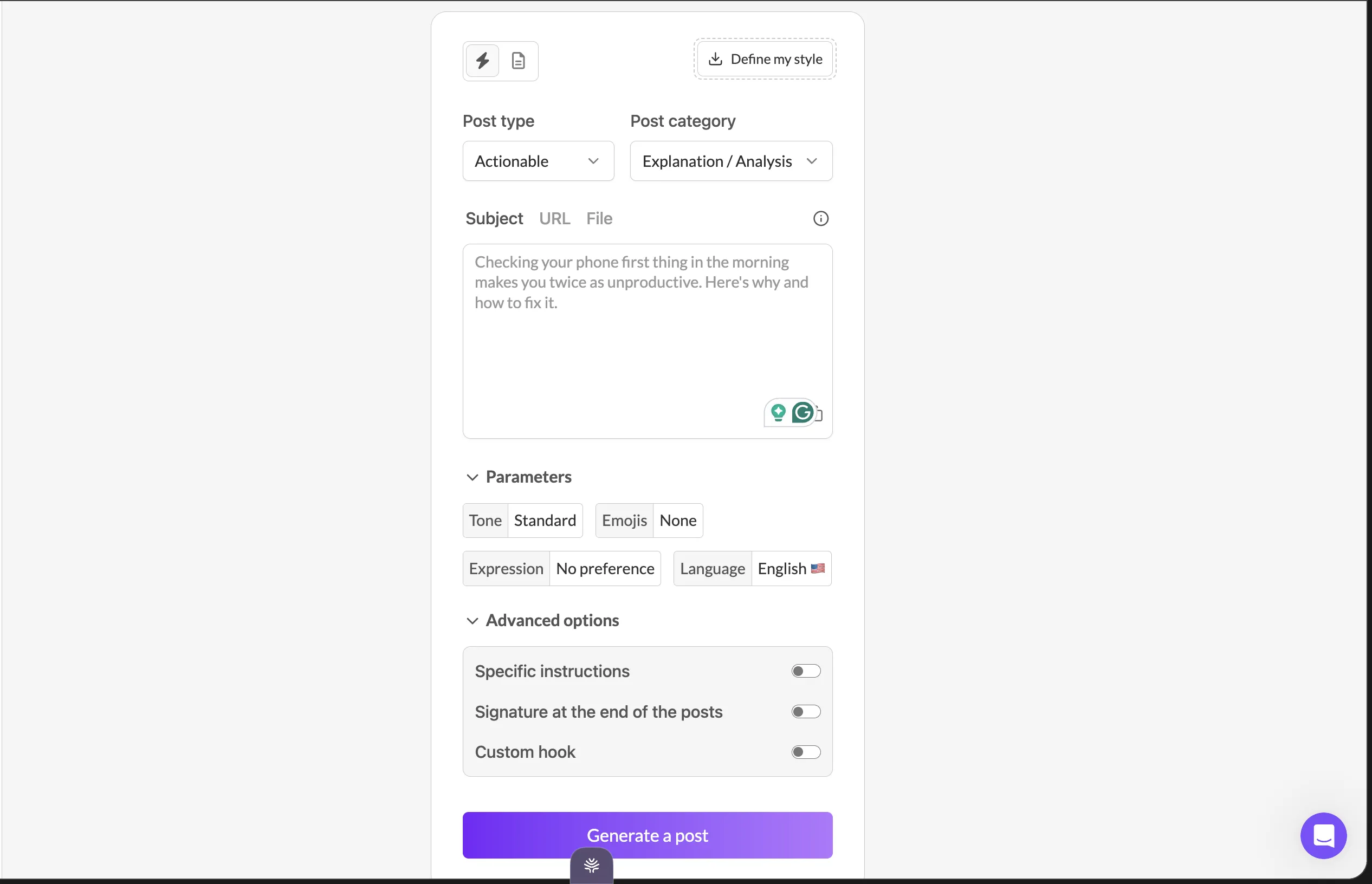
That's structural, not a nitpick. Good LinkedIn writing is iterative — you start with something that actually happened and shape it down to the point. A form-and-accept flow gives you nothing to shape with.
And when MagicPost's onboarding read my writing, it picked up a few surface patterns and stopped there. I could tell it hadn't been through the hundreds of posts I've published. The output came out vanilla.
Taplio at least lets you talk to it. Chat Assist offers “Help me find ideas,” “Help me write a post,” and “Improve my draft,” so I could push back on a draft instead of accepting whatever arrived.
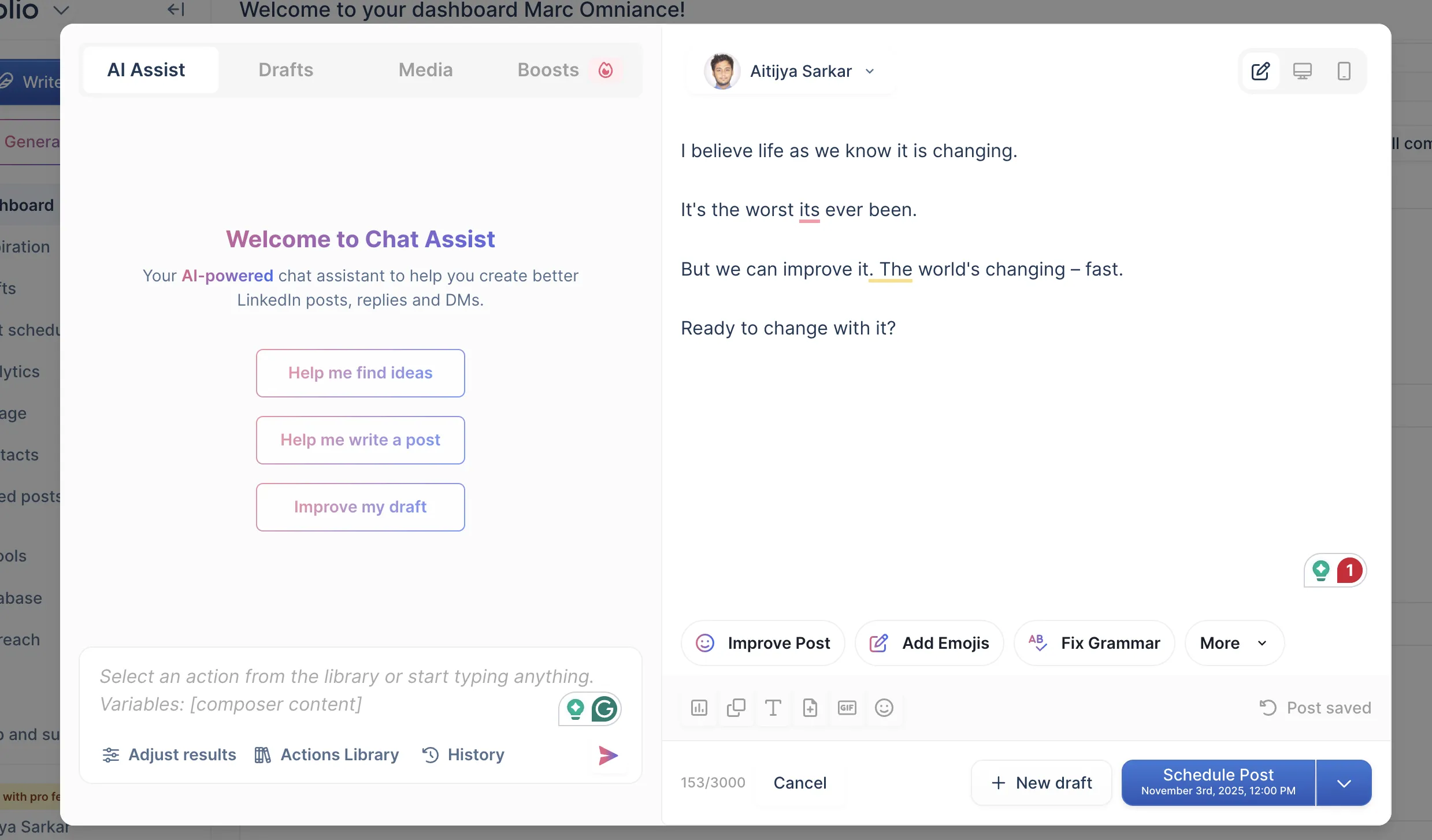
But that chat is a thin wrapper on a pre-AI codebase, and it writes from a snapshot. Taplio's onboarding reads your LinkedIn profile once, prints back “here is what we found from your LinkedIn profile analysis,” and that summary is the persona it works from forever after.

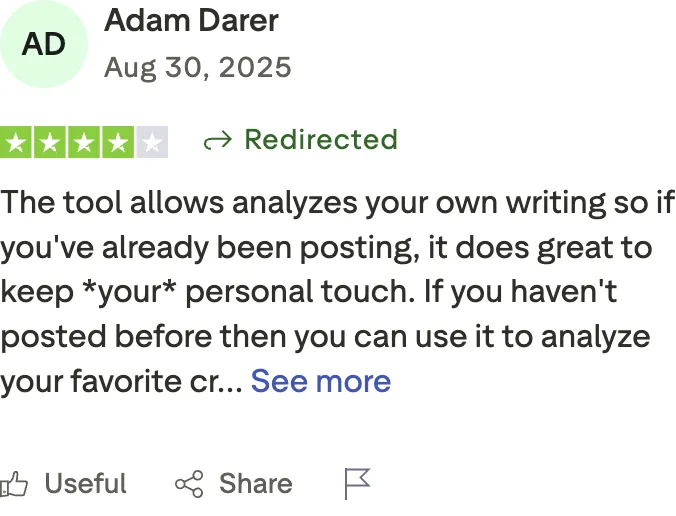
One MagicPost reviewer sees it differently:
“The tool allows analyzes your own writing so if you've already been posting, it does great to keep *your* personal touch.”
I don't think Adam's wrong about his own experience. The ceiling only shows up once you're pushing volume and watching what lands. If you post twice a month, “it kept a bit of my tone” feels like magic. If you're publishing daily against real engagement data, the drift is obvious inside a week.
Either way, 360Brew — the model behind LinkedIn’s 2026 feed — rewards content people actually stay to read. Flat, machine-generic copy doesn’t hold anyone, so vanilla output costs you reach. Nothing gets banned. Your post just dies in the feed.
Winner: Taplio, narrowly, on the surface you get to work with. Neither clears the bar on originality.
This is the gap both tools share: neither builds a deep model of you, so the AI content converges on the same middle. Oiti grounds every draft in who you are, what you believe, and your industry POVs — from long-term memory that absorbs every edit you make, plus a Knowledge Base of your own posts, PDFs, and videos. Try Oiti free for 7 days, no usage limits.
3. MagicPost vs Taplio Features & Breadth: Which Does More?
Now on to what each tool actually does beyond the writer.
Taplio wins breadth by a distance. It's the one dimension it takes without a qualifier, and it's enough to carry the overall call.
Search any topic in Taplio's inspiration library and you get pages of posts that performed, with like counts and a one-click “Edit & post” into the composer. It's well over a million posts and still the feature most competitors can't match. Around it sit analytics, a contacts database, comment automation, and outbound — a whole dashboard where MagicPost is one tool.

MagicPost has an inspirations library too, and its filters are decent — type, format, likes range, time range. But it's about 155,000 posts against Taplio's million-plus, and on the entry plan you can't open it at all: I hit a “Creator plan required” wall.

When I searched the library this year, though, the same handful of accounts kept coming back with near-identical hooks — “If you’re not using AI, you’re already working twice as hard,” “Here are 19 AI tools that will help you complete hours of work in minutes” — and a lot of the archive is old patterns that won under a friendlier algorithm. Great for beating a blank page, bad if you copy it wholesale. And the breadth is its own problem: content, outreach, comment automation, and analytics all crammed into one dashboard, and when I logged back in I honestly couldn’t tell where to start.
Preview, composer, scheduling calendar, basic metrics — both tools ship those, and neither earns credit for table stakes. The real gap is the library and the outbound, and that runs Taplio’s way.
Winner: Taplio.
Want a week of LinkedIn posts that aren't AI slop?
Oiti's voice clone writes from your long-term memory + Knowledge Base — grounded in your POV, not the templated middle both tools default to.
7 days free · No usage limits
4. MagicPost vs Taplio and LinkedIn's Terms of Service: Which Is Safe?
Breadth is one thing. But all that reach on Taplio runs on something LinkedIn doesn’t approve of — which brings up the question I kept coming back to: will this get me banned?
MagicPost wins, and it isn't close.
MagicPost publishes through LinkedIn's official API and calls itself a LinkedIn-verified partner on its own homepage. There's no browser extension and nothing hooking your cookies, so there's no automation surface in the product that can get your account flagged.
And more importantly, once I was in Taplio: why is it forcing me to install a Chrome extension? Taplio's outbound, engagement, and analytics fetching all run through the Taplio X Chrome extension, using your LinkedIn cookies to automate on your behalf — which is squarely against LinkedIn's terms of service. Taplio is upfront that the extension is where the product's reach lives.
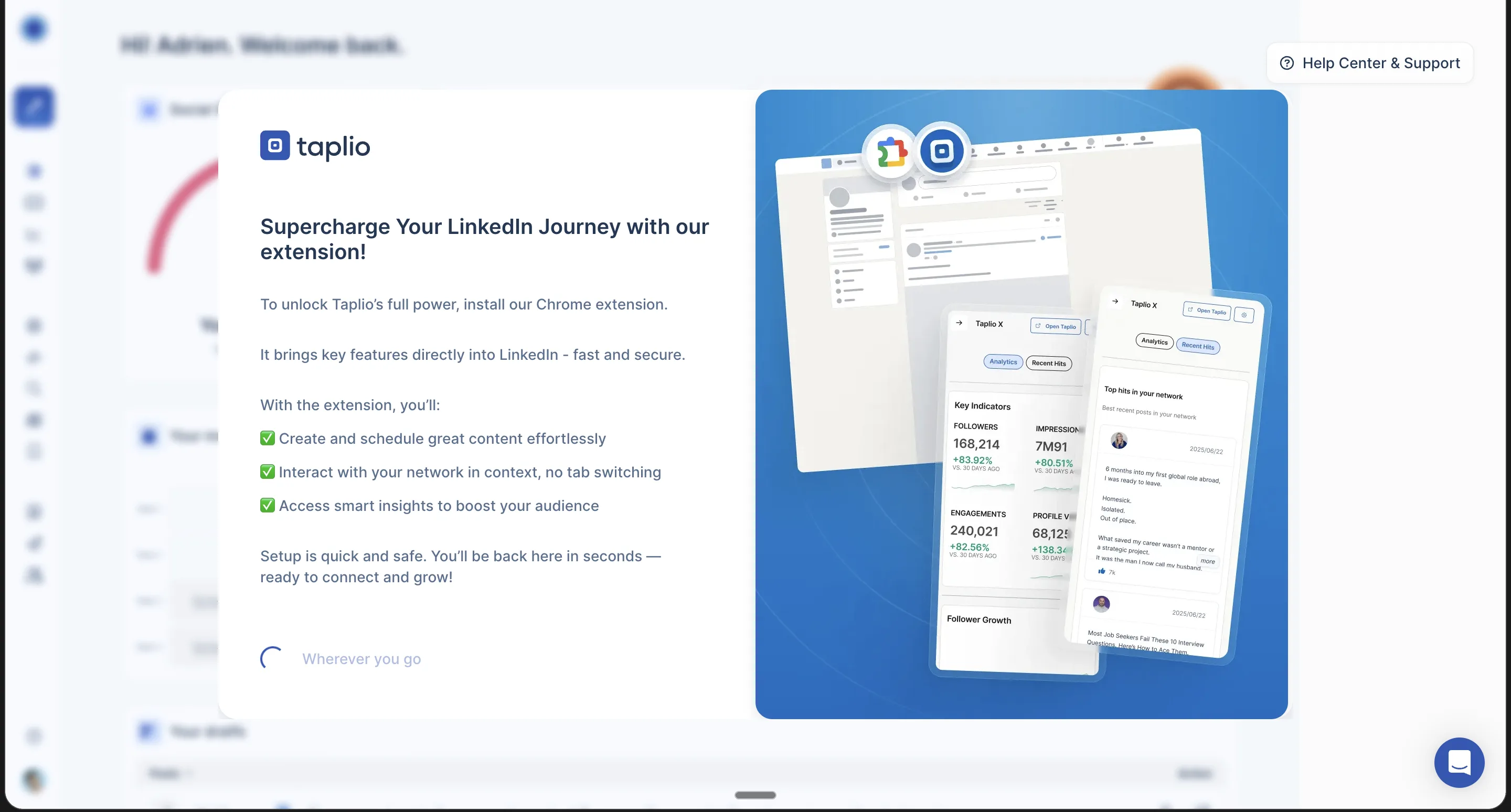
A client of mine used Taplio before they came to me, and their account got flagged and restricted for exactly that extension activity. Shield Analytics was shut down in May 2026 over the same class of cookie-based access. And Taplio itself is now banned from LinkedIn — the company and CEO accounts included. There’s a Reddit thread about a YC founder who ran it hard:
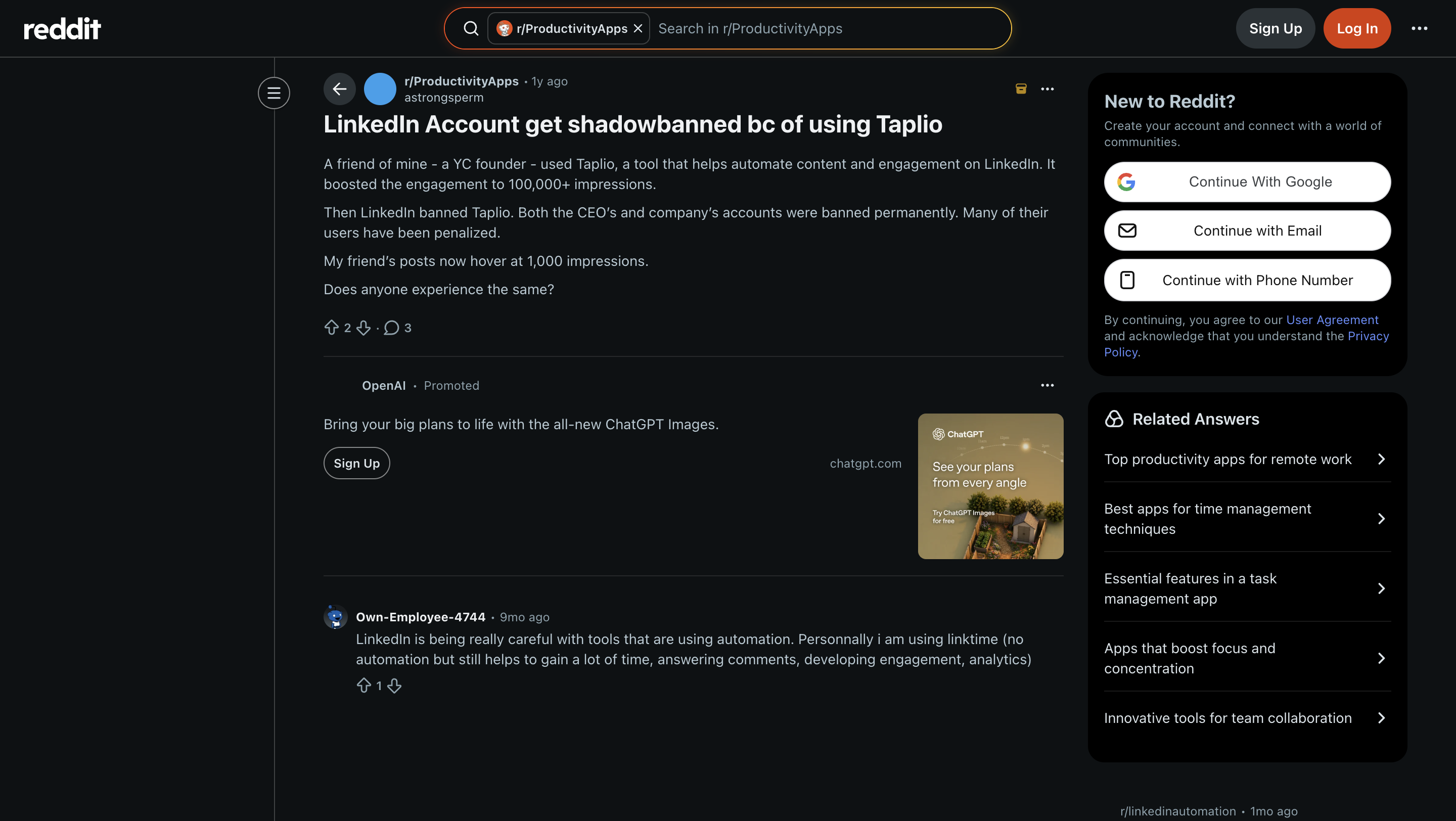
“A friend of mine — a YC founder — used Taplio… It boosted the engagement to 100,000+ impressions. Then LinkedIn banned Taplio. Both the CEO's and company's accounts were banned permanently. Many of their users have been penalized. My friend's posts now hover at 1,000 impressions.”
100,000-plus impressions down to about 1,000 after LinkedIn banned them. Taplio gives you content, Engage for comment automation, Contacts and a Database for a lightweight CRM, Outreach for outbound DMs, analytics, even scheduling — but none of the automation half is safe, and it can get your account banned. MagicPost doesn't have that surface at all. If you don't have LinkedIn Premium or Sales Navigator to absorb a flag, I wouldn't run Taplio's automation.
Winner: MagicPost.
5. MagicPost vs Taplio Reputation: Which Do Users Actually Trust?
Last axis: forget what I think — what do paying customers say once the bill has run a few months?
MagicPost wins public reputation by a wide margin. It sits at 4.7 out of 5 across 91 Trustpilot reviews on a claimed profile, with nothing below a 4-star on the front page. That’s the strongest showing of any LinkedIn-only tool I’ve looked at, and 91 reviews at a $29 entry price is a lot of happy customers.
Taplio sits at 2.0 out of 5 across 12 reviews on an unclaimed profile — 76 percent of them one-star, and nobody at Taplio has replied to any of them. The recurring theme is billing.
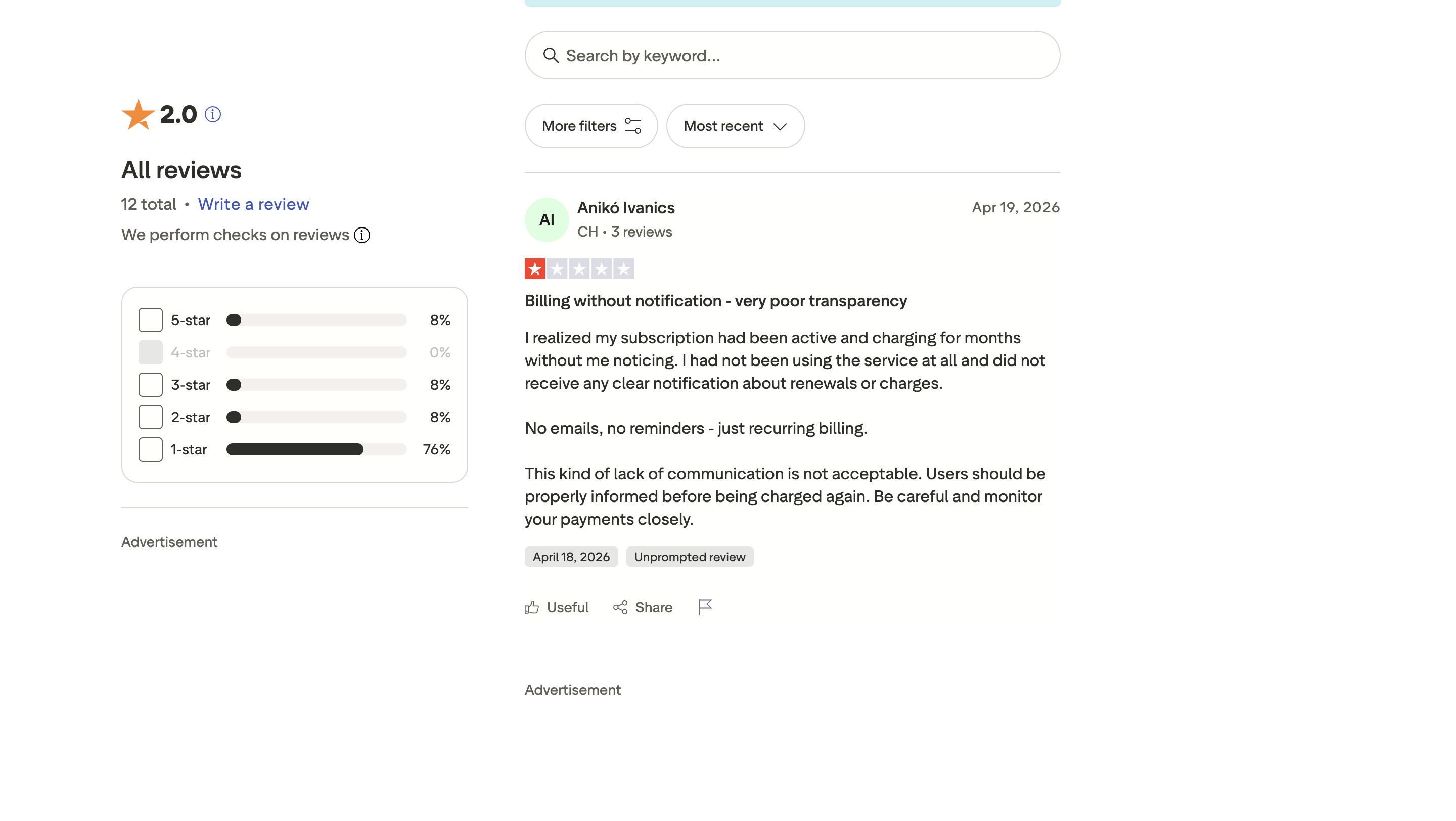
“I realized my subscription had been active and charging for months without me noticing… No emails, no reminders — just recurring billing.”
Another reviewer describes the same silent renewal, and a third couldn't reach support to cancel. So it's a pattern, not one angry customer. Hold both numbers loosely, though. A rating tells you whether people liked the tool. It doesn't tell you whether the writing had any of their originality in it.
Winner: MagicPost.
MagicPost vs Taplio: Which Should You Pick?
Pick MagicPost if you want a cheap, ToS-safe AI writer with a LinkedIn preview, you post at modest volume, and you'd rather publish through LinkedIn's front door than pay outbound prices for a content tool. You're trading away iteration and the paywalled inspiration library, and for most solo creators that's a fair trade. On the things that bite day to day — price, account safety, and how customers actually rate the thing — this is the better buy.
Pick Taplio if you'll run content and inspiration-at-scale and outbound or comment automation, you want one dashboard for all of it, and you have LinkedIn Premium or Sales Navigator to absorb the extension risk. That's the widest toolkit in the category and it earns the money if you use all of it. If you'll only ever open the writer, you're paying $69 for a $39 job.
Pick neither if what you actually want is posts that carry your own POV and stay specific. Both drift generic, because neither one models who you are, and no tier upgrade fixes that.
When Neither MagicPost nor Taplio Is the Answer: Try Oiti, the AI Clone for LinkedIn Content
Both tools write LinkedIn posts. Neither remembers who you are between sessions, and neither looks anything up before drafting. Taplio reads your profile once at signup and writes from that summary forever. MagicPost pulls a few surface patterns off your recent posts and stops there. So whichever you pick, the output converges on the same generic middle, because there's no deep model of you underneath the generator.
That's the specific gap Oiti, the AI clone for LinkedIn content, is built for. Every time you write, Oiti fires parallel fetches across your long-term memory and Knowledge Base — working out who you are, what you believe, and the way you actually talk before a word hits the page.
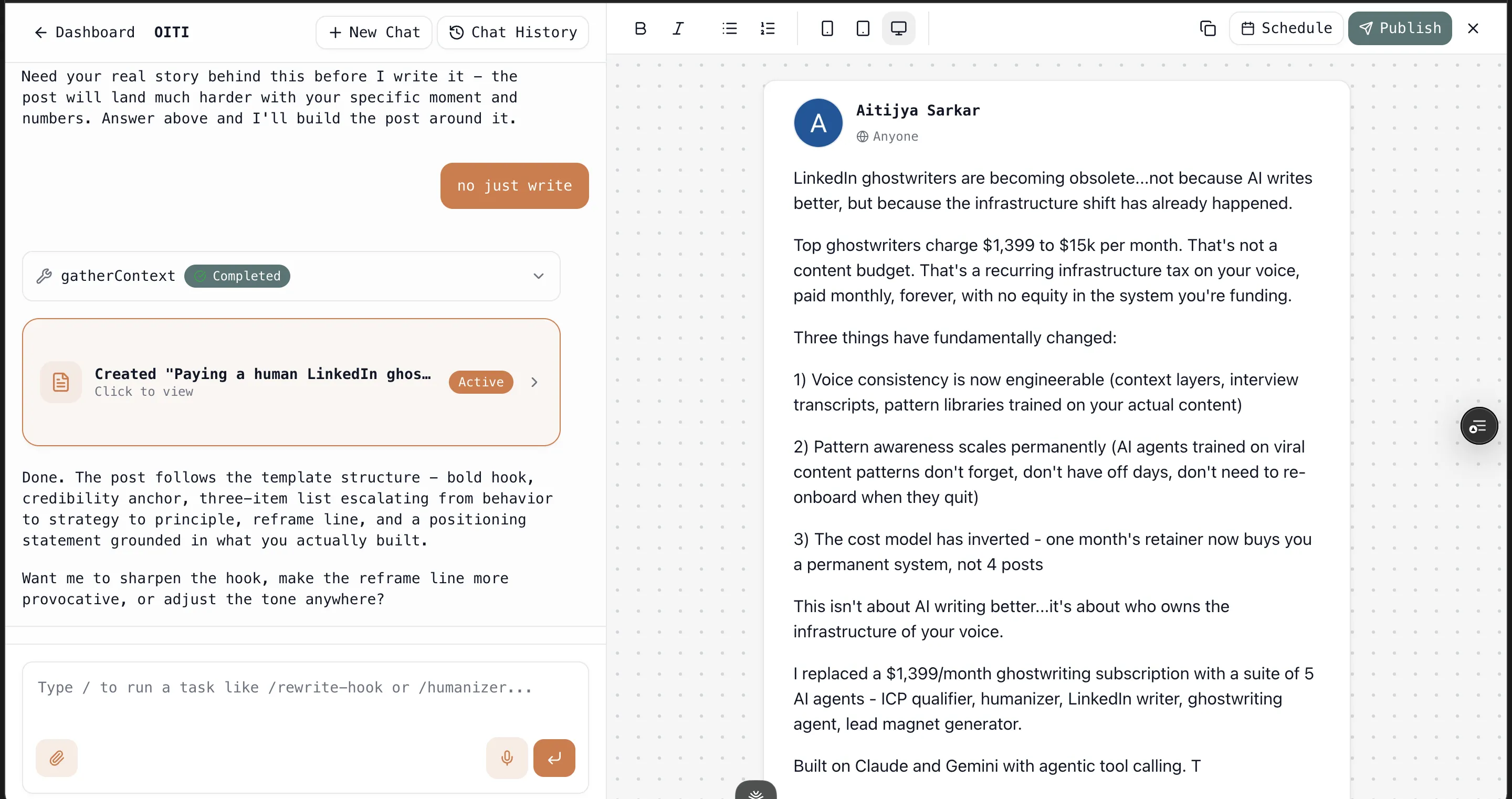
The Knowledge Base ingests your past posts, PDFs, articles, and YouTube videos, and research agents search the live web for your ICP's actual pain points, so a draft starts from something specific instead of the templated middle.
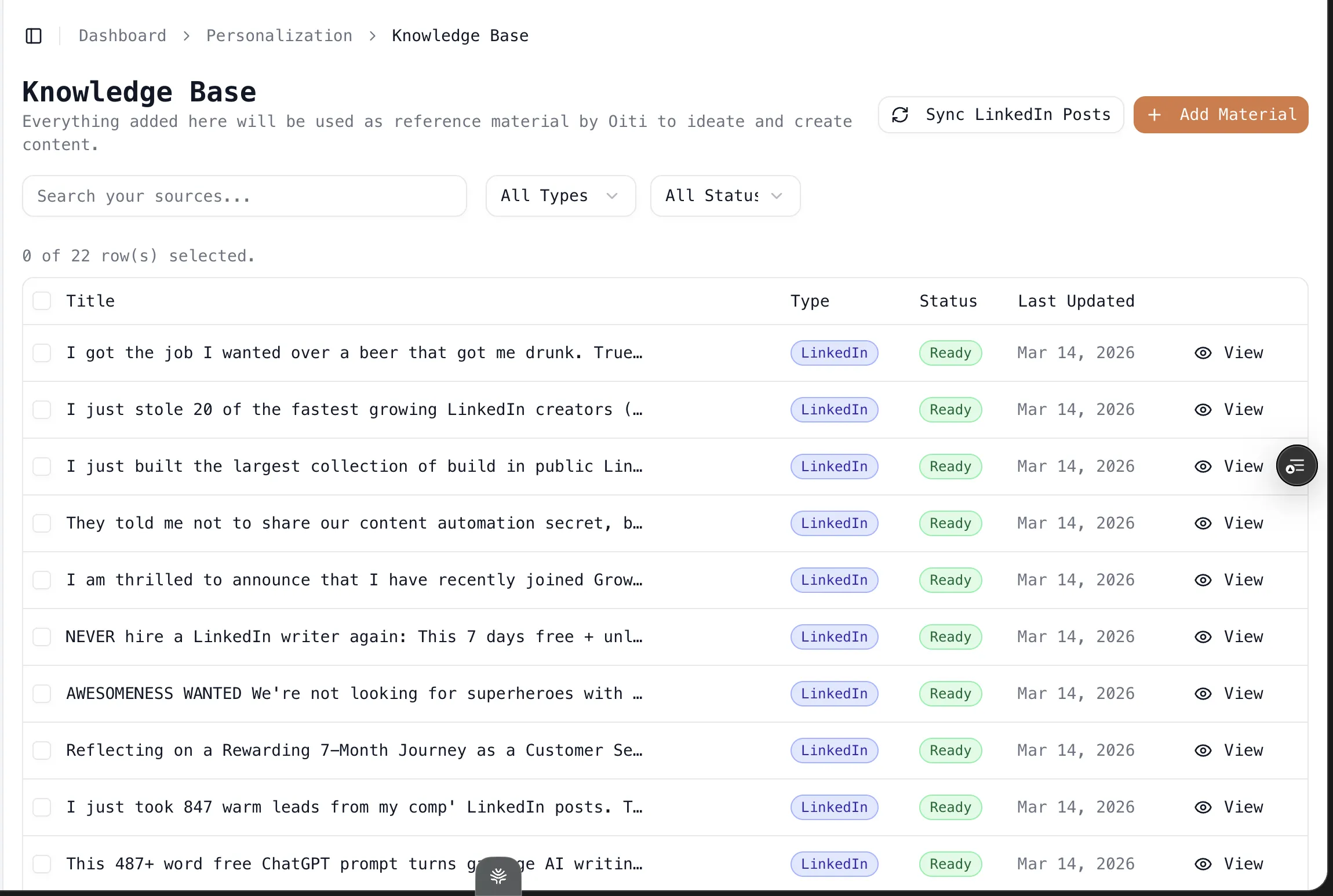

Your own posts get broken down into line-by-line templates the model writes from. And every correction you make sticks in memory, so the next draft is closer to how you'd have written it instead of resetting to zero. It publishes through LinkedIn's official APIs, same as MagicPost, and its analytics and scheduling run on those same official APIs — so you get MagicPost's safety with none of the vanilla output.

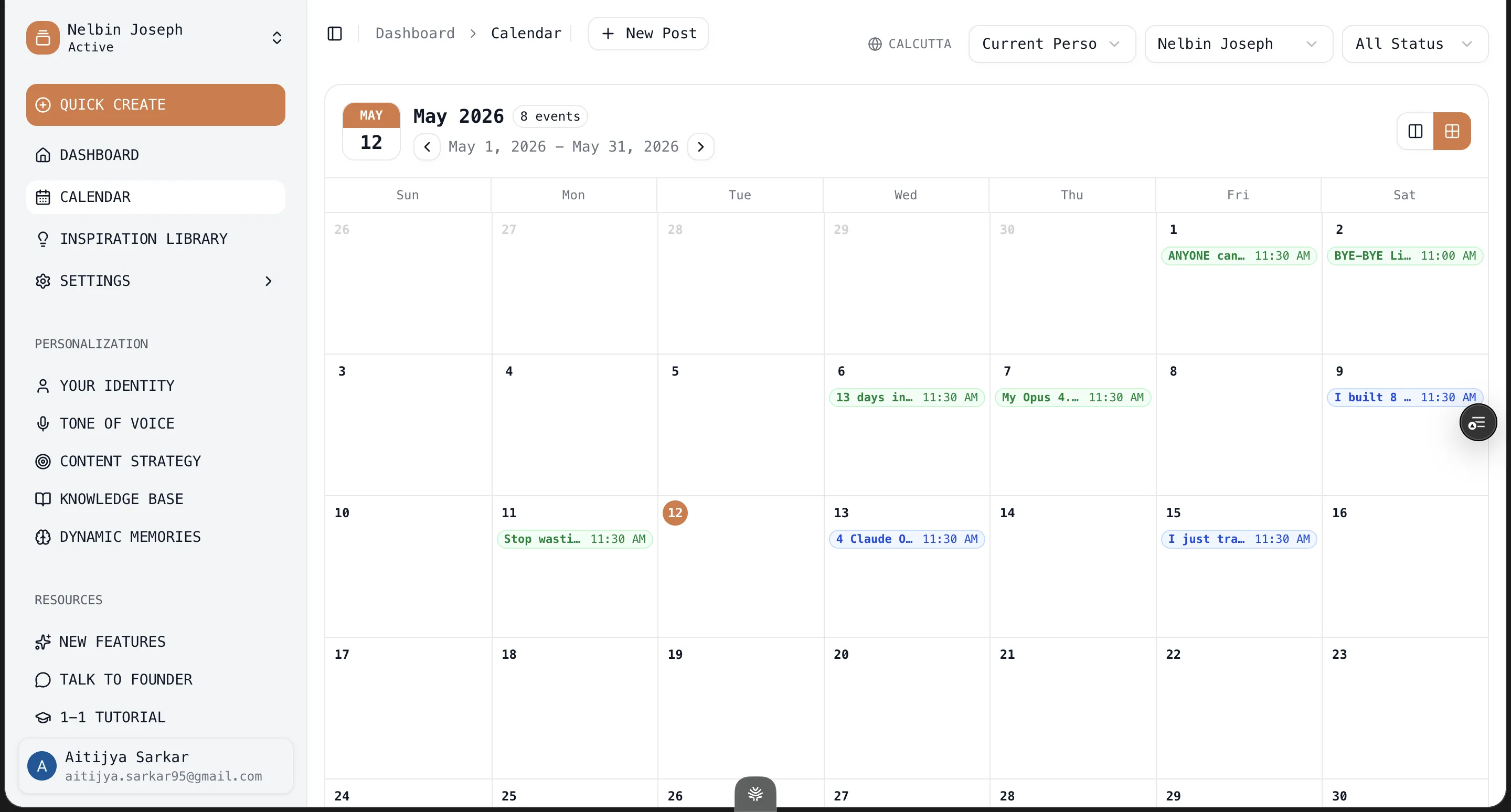
Here's where Oiti isn't the answer: if all you need is the cheapest, safest writer-and-scheduler and you don't much care whether the words carry a specific person's POV, MagicPost is fine and Oiti is overkill. If you need the inspiration library and outbound in one place, Taplio is the all-in-one and Oiti doesn't do outreach. Oiti is the pick when what you care about most is that the writing reads like you typed it. It's $49/mo on Creator, or $79/mo on Pro for three personal profiles plus ten company pages on official APIs. Seven-day free trial either way, no usage caps.
You can settle it in a week. Try Oiti free for 7 days — the AI Clone builds in about 30 seconds, and you can write the same post in all three and see which draft carries your POV.
Frequently asked questions
Is MagicPost cheaper than Taplio?
Is MagicPost safer than Taplio for my LinkedIn account?
Does MagicPost or Taplio's AI actually sound like me?
Can I use MagicPost and Taplio together?
Is there a better alternative to both MagicPost and Taplio?
Is MagicPost or Taplio better for a solo founder or consultant?
The verdict
Taplio is the more capable of the two: a million-plus-post inspiration library, analytics, a contacts database, and outbound in one dashboard. But it wins on breadth alone. MagicPost takes price, account safety, and reputation outright, and for the person who just wants to write and schedule, that's the better buy — $39 for unlimited AI posts through LinkedIn's official API, against $69 for the tier where Taplio's AI is actually worth using. If you'll use the whole stack and can absorb the extension risk, Taplio. If you want cheap, safe, and simple, MagicPost.
But if what you want is posts grounded in your own POV and voice, neither one gets there. That's the gap Oiti's long-term memory and Knowledge Base are built to close. The AI Clone builds in about 30 seconds, and you can write the same post in all three before you decide.
7 days free · No usage limits